APS Integrations for ERP, MES, WMS, and Supply Chain Systems
Connect PlanetTogether APS with the systems your manufacturing team already uses, including ERP, MES, WMS, inventory, labor, and supply chain platforms. Use APIs, database connections, file exchange, and integration tools to keep scheduling data aligned across planning and execution.
Give planners a realistic production schedule built from current orders, materials, capacity, labor, routings, and shop-floor data without replacing your core business systems.
Built to complement ERP, MES, WMS, and supply chain systems, not replace the systems your team already uses.
Why APS Integration Matters for Production Scheduling
Production schedules are only as reliable as the data behind them. When order, inventory, material, labor, capacity, and shop-floor data live in separate systems, planners often rely on manual exports, spreadsheets, and outdated assumptions. PlanetTogether APS integrations bring that data into one scheduling view so teams can build realistic production schedules around current constraints instead of disconnected information.
APS integration helps manufacturers:
Reduce manual data handling
Eliminate repeated exports, spreadsheet cleanup, and rekeying between ERP, MES, inventory, labor, and planning systems.
Improve schedule accuracy
Use current orders, routings, inventory, capacity, labor, and shop-floor updates to create more realistic schedules.
Respond faster to change
Help planners see when material shortages, labor gaps, machine downtime, or priority changes affect the production plan.

You May Need APS Integration If Your Scheduling Data Lives Across Too Many Systems
![]()
Your production schedule may depend on data spread across ERP, MES, WMS, inventory, labor, shop-floor, supply chain, and planning systems.
- Planners manually export and clean ERP data before scheduling.
- Material, labor, or capacity updates do not reach the schedule quickly enough.
- ERP dates and shop-floor reality often disagree.
- Production teams rely on spreadsheets to bridge gaps between systems.
- Late orders, shortages, or capacity conflicts are discovered too late.
- Your IT team wants a scheduling solution that complements ERP instead of replacing it.
If two or more sound familiar, your scheduling process may need a better connection between ERP, shop-floor, material, labor, and planning data.
![]()
An APS integration review can help identify where disconnected data is affecting schedule reliability.
What an APS Integration Review Includes:
- Current ERP, MES, WMS, labor, inventory, supply chain, and planning systems
- Required scheduling data, including what PlanetTogether APS receives and sends back
- Integration method options, such as API, database connection, flat-file exchange, middleware, Azure Data Factory, or iPaaS
- Field mapping, data quality, and validation requirements
- Estimated integration scope, timeline, and implementation steps

Integration Success Story | Medical Device Manufacturer Case Study
In less than 60 days, a medical device manufacturer used PlanetTogether APS to eliminate:
250 forecast-based production orders eliminated
Approximately 15% reduction in inventory overhead
Approximately 20% lower overtime labor costs
By connecting scheduling with current production and material data, the team moved from forecast-driven production to a more responsive, data-driven APS scheduling process.

.png?width=800&height=450&name=pharmaceutical%20industry%20medicine%20(3).png)
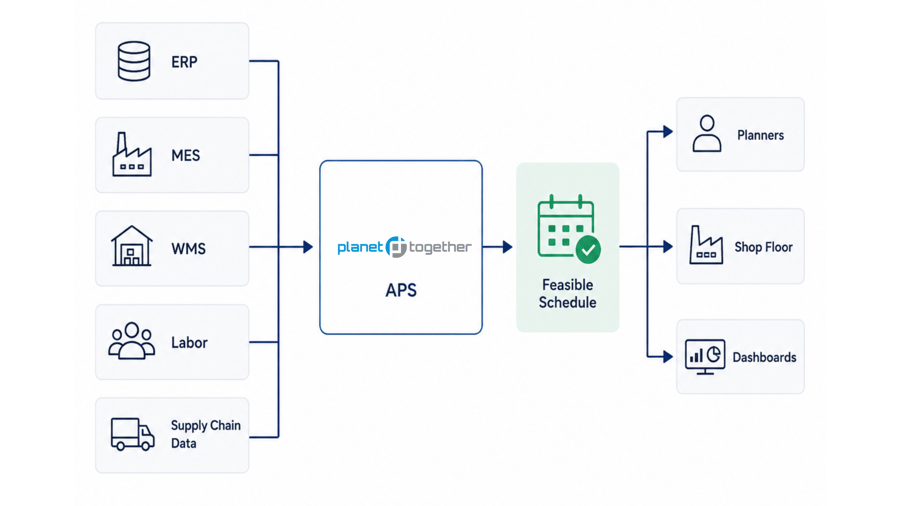
How PlanetTogether APS Integrations Work.
Data Exchanged Between PlanetTogether APS and Connected Systems.
PlanetTogether APS connects with ERP, MES, WMS, labor, inventory, and supply chain systems to exchange the data needed for realistic production scheduling. Depending on your environment, integrations may use APIs, database connections, flat-file exchange, middleware, Azure Data Factory, or customer-owned iPaaS tools.


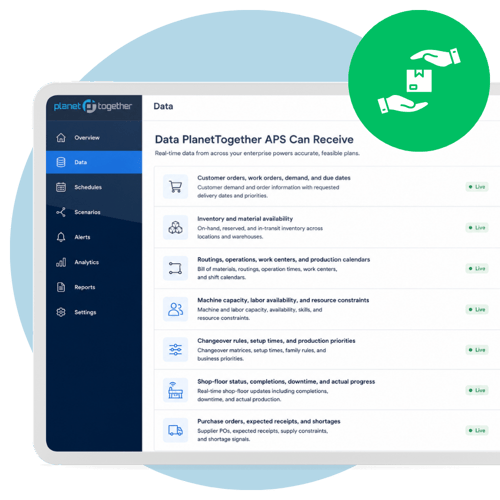
Data PlanetTogether APS Can Receive
- Customer orders, work orders, demand, and due dates
- Inventory and material availability
- Routings, operations, work centers, and production calendars
- Machine capacity, labor availability, and resource constraints
- Changeover rules, setup times, and production priorities
- Shop-floor status, completions, downtime, and actual progress
- Purchase orders, expected receipts, and shortages

Data PlanetTogether APS Can Send Back
- Updated production schedules
- Planned start and finish dates
- Resource assignments
- Schedule changes and sequencing updates
- Material and capacity constraint alerts
- Production priorities for ERP, MES, or shop-floor execution
- Visibility into schedule impact when demand, material, or capacity changes
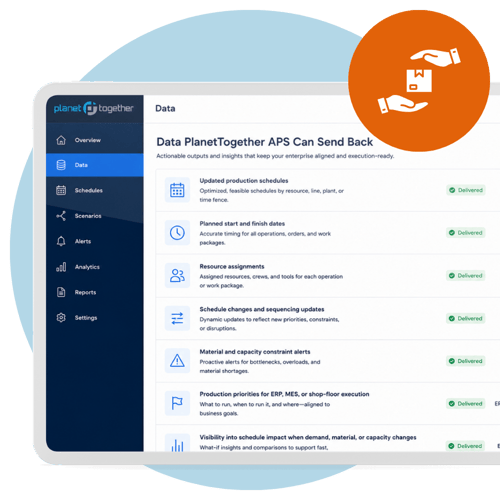
This data exchange helps planners move from static planning assumptions to schedules that reflect current manufacturing conditions.
ERP, MES, WMS, Labor, and Supply Chain Systems PlanetTogether APS Can Integrate With
PlanetTogether APS can connect with multiple types of manufacturing and planning systems. The examples below are representative, not a complete list.
|
System Type |
Examples |
Common Data Exchanged |
Scheduling Value |
|---|---|---|---|
|
ERP |
SAP, Microsoft Dynamics, Oracle, NetSuite, Infor, Epicor, QAD |
Orders, purchase orders, inventory, routings, due dates, item masters, work centers |
Turns business data into a realistic production schedule |
|
MES |
AVEVA, Plex MES, and other execution systems |
Production status, completions, downtime, actual run progress |
Keeps schedules aligned with shop-floor reality |
|
WMS / Inventory |
Warehouse and inventory systems |
Material availability, inventory balances, shortages, receipts |
Prevents schedules from relying on unavailable materials |
|
SCM / Planning |
Kinaxis, John Galt, Blue Ridge, and planning systems |
Demand, forecasts, supply plans, planning priorities |
Connects supply chain plans to executable production schedules |
|
Labor / Workforce Systems |
Shiftboard and employee scheduling systems |
Labor availability, skills, shifts, crew coverage |
Helps schedules reflect available people, not just available machines |
|
Integration Middleware / Data Platforms |
Azure Data Factory, customer-owned iPaaS, middleware |
Field mappings, transformed data, synchronization workflows |
Supports flexible data exchange across complex IT environments |
PlanetTogether APS Complements ERP. It Does Not Replace ERP.
-
PlanetTogether APS does not replace ERP. ERP remains the system of record for orders, inventory, purchasing, financials, and business records.
-
PlanetTogether APS uses ERP and operational data to create a more realistic production schedule based on capacity, labor, materials, routings, changeovers, and shop-floor conditions.
-
PlanetTogether APS adds a specialized scheduling layer on top of your existing ERP and operational systems. It uses ERP data as a foundation, then helps planners create more realistic production schedules based on the constraints that determine what can actually run.
This means manufacturers can keep ERP as the system of record while using PlanetTogether APS to improve production scheduling, scenario analysis, bottleneck visibility, and schedule responsiveness.
The key point is simple: PlanetTogether APS does not require teams to abandon the systems they already depend on. It helps those systems work better together by turning business, inventory, and production data into an executable schedule.
See which data connections would support a more realistic production schedule.
What Manufacturers Gain from APS Integration
APS integration helps manufacturers keep scheduling decisions aligned with current operational data across ERP, MES, WMS, labor, and shop-floor systems.

Keep schedules aligned with current data
Use connected order, inventory, material, labor, and shop-floor data to reduce outdated scheduling assumptions.

Reduce manual schedule updates
Limit repeated exports, spreadsheet cleanup, and rekeying between ERP, MES, WMS, and planning systems.
Expose material and capacity constraints earlier
Help planners see when shortages, overloaded resources, labor gaps, or downtime may affect production.
Support better scenario planning
Compare schedule options using current operating data before changing priorities, promising dates, or releasing work to the floor.
Ready to See How PlanetTogether APS Fits Your Tech Stack?
Talk with an integration specialist about your ERP, MES, WMS, labor, inventory, and supply chain systems. See how PlanetTogether APS can help connect planning data to a more realistic production schedule. Let's talk through your current systems, integration options, and scheduling data requirements.
PlanetTogether APS Integration FAQs
Answers to common questions about connecting PlanetTogether APS with ERP, MES, WMS, labor, inventory, and supply chain systems.
What systems can PlanetTogether APS integrate with?
PlanetTogether APS can connect with ERP, MES, WMS, inventory, labor, workforce scheduling, supply chain planning, and integration middleware systems. Examples may include SAP, Microsoft Dynamics, Oracle, NetSuite, Infor, Epicor, QAD, AVEVA, Plex MES, Kinaxis, John Galt, Blue Ridge, Shiftboard, Azure Data Factory, and customer-owned iPaaS or middleware platforms. These examples are representative, not a complete list.
Does PlanetTogether APS replace ERP?
No. PlanetTogether APS complements ERP rather than replacing it. ERP remains the system of record for orders, inventory, purchasing, financials, and business records, while PlanetTogether APS uses ERP and operational data to create realistic, constraint-based production schedules.
What data can PlanetTogether APS receive from connected systems?
PlanetTogether APS can receive data such as customer orders, work orders, demand, due dates, inventory levels, material availability, purchase orders, routings, operations, work centers, production calendars, machine capacity, labor availability, changeover rules, setup times, and shop-floor status.
What data can PlanetTogether APS send back to connected systems?
PlanetTogether APS can send back updated production schedules, planned start and finish dates, resource assignments, schedule changes, sequencing updates, material and capacity constraint alerts, and production priorities for ERP, MES, or shop-floor execution systems.
How long does an APS integration typically take?
Many PlanetTogether APS integrations can be completed in about 4–8 weeks, depending on the systems involved, data quality, integration method, field mappings, and project scope. More complex multi-system or multi-site integrations may require additional planning and validation.
Which integration methods does PlanetTogether APS support?
PlanetTogether APS integrations may use APIs, database connections, flat-file exchange, middleware, Azure Data Factory, or customer-owned iPaaS tools. The best integration approach depends on your systems, IT environment, data requirements, and scheduling process.
Can PlanetTogether APS connect with multiple systems at the same time?
Yes. PlanetTogether APS can connect with multiple systems so planners can align ERP, MES, WMS, labor, inventory, and supply chain data in one scheduling process. This helps reduce disconnected spreadsheets, manual updates, and outdated scheduling assumptions.
What IT resources are needed for integration?
Your IT team will typically help with system access, data exports, API or database connections, field mappings, testing, and validation. PlanetTogether can work with your IT and operations teams to define the data needed and choose an integration approach that fits your environment.