What is Advanced Planning and Scheduling (APS)?

Advanced Planning and Scheduling (APS) software helps manufacturers create realistic production schedules around capacity, materials, labor, routings, changeovers, setup times, and due dates

If your team relies on spreadsheets, manual schedule updates, or ERP dates that do not match shop-floor reality, APS may help you build schedules the plant can actually run.

Compare APS vs ERP Scheduling → 

What Advanced Planning and Scheduling Software Does  


Advanced Planning and Scheduling (APS) software helps manufacturers turn demand, orders, inventory, capacity, labor, routings, changeovers, and due dates into a realistic production schedule.

Unlike basic planning tools or spreadsheets, APS checks the schedule against real manufacturing constraints. It helps planners see whether work can actually run on available machines, crews, materials, and work centers before committing to dates.

APS is especially useful when production teams need to find bottlenecks earlier, test schedule changes, compare what-if scenarios, and keep work moving when conditions change.

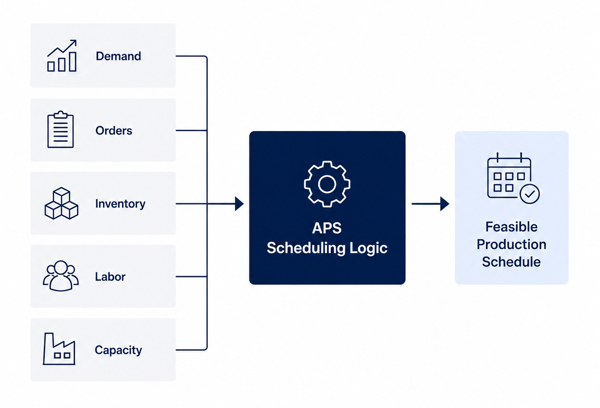
Advanced Planning and Scheduling software turning orders, capacity, materials, labor, and due dates into a feasible production schedule.
What Advanced Planning and Scheduling Software Does

APS may be a fit if your team:

  • Rebuilds schedules manually when priorities change
  • Uses spreadsheets to work around ERP scheduling gaps
  • Struggles with capacity, material, labor, or changeover constraints
  • Needs better visibility into what the plant can realistically produce 

How Advanced Planning and Scheduling Works


Advanced Planning and Scheduling software uses production data from ERP, MES, inventory, labor, and shop-floor systems to build schedules around real manufacturing constraints.

Instead of planning from fixed assumptions, APS checks each job against the resources, rules, and priorities needed to run it, including machines, work centers, crews, materials, routings, setup times, changeovers, due dates, and production calendars.

In practice, APS works through five basic steps: 

APS collects planning data

APS uses inputs such as customer orders, demand, inventory, material availability, routings, work centers, labor, machine capacity, setup times, and due dates.

APS checks real constraints

The system evaluates whether each job can run based on available capacity, materials, labor, tooling, changeover rules, and production calendars.

APS creates a realistic production schedule

Planners can see what can realistically run, when it can run, and where bottlenecks or conflicts may affect the plan.

APS helps planners test changes

When demand, materials, labor, or capacity changes, planners can compare options, adjust priorities, and test what-if scenarios before changing the schedule.

APS keeps teams aligned

The resulting schedule gives production, operations, and planning teams a clearer view of priorities, constraints, and expected completion dates.


APS is especially useful when your team needs to move beyond static plans, manual schedule updates, or ERP dates that do not match current plant conditions. 

Next Steps
Explore PlanetTogether APS Software →
Compare APS vs ERP Scheduling →
See APS Software Integrations →

 Where APS Fits with ERP, MRP, and MES 


Manufacturers often use ERP, MRP, and MES systems to manage business data, material planning, and shop-floor execution. Advanced Planning and Scheduling software does not usually replace those systems. APS uses data from them to create realistic production schedules around capacity, materials, labor, routings, changeovers, and due dates.

In simple terms: ERP manages business records, MRP plans materials, MES tracks production activity, and APS helps planners decide what can realistically run, when it can run, and which resources are needed.


System Main Role  How APS Uses It 
ERP Manages business records such as customer orders, inventory, purchasing, finance, item masters, and routings. APS uses ERP data to build realistic production schedules based on current constraints.
MRP Calculates material requirements and planned supply based on demand, inventory, and lead times. APS uses material availability and supply timing to help determine what work can actually be scheduled.
MES Tracks shop-floor execution, production status, completions, downtime, and actual progress. APS can use MES and shop-floor data to keep schedules aligned with current production conditions.
APS Creates constraint-aware production schedules around capacity, labor, materials, routings, setup times, changeovers, and due dates. APS acts as the scheduling layer that helps planners turn business, material, and shop-floor data into feasible production plans.

APS may be worth evaluating if your current systems show what needs to happen, but planners still have to decide manually what can actually happen. 

Common signs include:

ERP dates do not match shop-floor reality.

MRP suggests material plans, but production still struggles with capacity conflicts.

MES shows what happened, but planners need better visibility into what should happen next.

Planners use spreadsheets to bridge gaps between ERP, MRP, MES, and production scheduling.

Next Steps
Compare APS vs ERP Scheduling →
Explore APS Software Integrations →
Explore PlanetTogether APS Software → 

You May Need APS When Production Scheduling Becomes Too Complex for Manual Planning 


Manufacturers often start with ERP planning, spreadsheets, or manual scheduling processes. Those tools can work when production is simple, but they become harder to manage as orders, materials, labor, capacity, changeovers, and due dates shift.

APS may be worth evaluating if your team is dealing with:

  • Rush orders that disrupt the schedule
  • Late materials or parts that change what can run
  • Tight labor or machine capacity
  • Long setup times or frequent changeovers
  • Bottlenecks that are discovered too late
  • ERP dates that do not match shop-floor reality
  • Planners rebuilding schedules manually in spreadsheets


When these problems become routine, APS gives planners a clearer way to build schedules from current data instead of old assumptions.

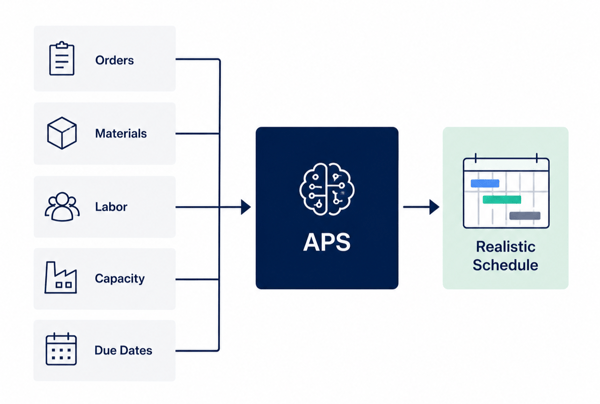
Advanced Planning and Scheduling software helping manufacturers manage orders, materials, labor, capacity, bottlenecks, and due dates.

Next Steps
Take the APS Readiness Score →
Explore Production Scheduling Software →
See the Excel Production Scheduling Alternative →

 Where APS Fits Across Manufacturing Industries


 APS is a strong fit for manufacturers with capacity limits, complex routings, batch production, shared resources, multi-site planning, or frequent schedule changes. 

life sciences (2)
Life Sciences 

laboratory icon
Chemical

food icon
Food & Beverage


aerospace icon
Aerospace & Defense

Industrial machines
Industrial Machines

packaging and printing
Printing & Packaging

Industries PT

Built for Complex and Multi-Plant Operations

Complex manufacturers often need to compare demand, capacity, materials, labor, and bottlenecks across one site, multiple sites, or shared resources. APS helps planners see constrained resources, evaluate tradeoffs, and standardize scheduling decisions across operations.


Explore The Different Sectors Applying Advanced Planning & Scheduling

How APS Connects with ERP, MES, Inventory, and Shop-Floor Systems


APS software usually connects with the systems manufacturers already use. It can receive data from ERP, MES, WMS, inventory, labor, and supply chain systems, then use that data to create a constraint-aware production schedule.

The goal is not to replace every existing system. APS acts as the scheduling layer that helps planners use business, material, capacity, labor, and shop-floor data to make better scheduling decisions.

software icon

APS can receive data from systems such as:

  • ERP systems: orders, inventory, routings, items, due dates, purchasing
  • MRP/planning systems: demand, forecasts, material requirements, supply plans
  • MES/shop-floor systems: production status, completions, downtime, progress
  • WMS/inventory systems: material availability, receipts, shortages, balances
  • Labor/workforce systems: shifts, skills, crew availability, labor constraints 

quality-control icon

APS can send schedule data back, such as:

  • Updated production schedules
  • Planned start and finish dates
  • Resource assignments
  • Schedule changes and sequencing updates
  • Material or capacity constraint alerts
  • Production priorities for ERP, MES, or shop-floor execution


Depending on the manufacturing environment, APS integrations may use APIs, database connections, flat-file exchange, middleware, Azure Data Factory, or customer-owned iPaaS tools. A good APS integration should help planners work from current data while still keeping ERP, MES, and other core systems in place.


APS integration is worth evaluating when schedule decisions depend on data spread across multiple systems and planners spend time exporting, cleaning, reconciling, or rekeying information before they can build a schedule.


Next Steps
Explore PlanetTogether APS Software →
Compare APS vs ERP Scheduling →
See Finite Capacity Scheduling Software →

What Data Does APS Need to Build a Realistic Schedule? 


Advanced Planning and Scheduling software depends on accurate production data. The better the data, the more realistic the schedule. APS uses information about demand, materials, capacity, labor, routings, setup times, and due dates to determine what can actually run.

APS does not need every system to be perfect before it can create value, but the most useful schedules come from data that reflects real plant constraints.

Common data APS uses includes: 

box icon
Orders and demand

Customer orders, work orders, forecasts, demand signals, due dates, and production priorities. 


inventory icon
Materials and inventory

On-hand inventory, expected receipts, shortages, purchase orders, component availability, and material constraints. 

mobility icon
Routings and work centers

Operations, routing steps, work centers, machines, production lines, tools, and required resources. 


quality-control icon
Capacity and calendars

Machine capacity, labor availability, crew schedules, shift calendars, downtime, holidays, and planned maintenance. 


kpis icon
Setup and changeover rules

Setup times, sequence-dependent changeovers, cleaning requirements, batch rules, allergen constraints, or campaign planning rules.  

planning icon-1
Shop-floor status

Completions, actual progress, delays, downtime, WIP status, and production feedback from MES or shop-floor systems. 


APS is especially useful when planners have some of this data available, but still need spreadsheets or manual work to turn it into a realistic production schedule.

Next Steps
Explore APS Implementation, Data Readiness & ROI →
See APS Software Integrations →
Take the APS Readiness Score →

What Affects APS ROI and Payback?


The return from Advanced Planning and Scheduling software depends on each manufacturer’s starting point, scheduling complexity, data readiness, and operating constraints. 

Manufacturers often evaluate APS ROI in areas such as:

  • Reduced overtime and manual scheduling effort
  • Less excess inventory and fewer rush changes
  • Better schedule adherence and on-time delivery
  • Faster response to material, labor, or capacity changes
  • Improved visibility across planning, operations, and customer service


PlanetTogether APS supports those gains by helping planners make better schedule decisions before problems reach the shop floor.

Next Steps
Explore APS Implementation, Data Readiness & ROI →
Take the APS Readiness Score →
Request an APS Demo →

medical devices aps

Case Study: Medical Device Manufacturer

Optimizing Outcomes, One Story at a Time

A leading medical device company upgraded from outdated scheduling methods to PlanetTogether APS. The result: a 15% reduction in inventory costs and a 20% cut in overtime, all while ensuring timely, high-quality deliveries.

Want to see Advanced Planning and Scheduling in action?

Threading the needle of optimized production hinges on advanced capacity planning and scheduling. Our free demo explains everything.

 
FAQ

 Advanced Planning and Scheduling FAQs 


What is APS software?

APS software creates production schedules by matching demand with available capacity. It checks machines, labor, materials, and due dates to build a more realistic plan. 

How is APS different from ERP?

ERP systems manage business data, such as orders, stock, purchasing, finance, and customer records. By contrast, APS uses planning data from those systems to build detailed production schedules.

In other words, ERP manages the business record. APS helps planners decide what to make, when to make it, and which resources to use.

Does APS replace ERP?

No. APS usually complements ERP. ERP remains the system of record for business data such as orders, inventory, purchasing, finance, and item records. APS uses planning data from ERP and other systems to create realistic production schedules around capacity, materials, labor, routings, and due dates.

What data does APS software need?

APS software commonly uses orders, demand, due dates, inventory, material availability, routings, work centers, labor availability, machine capacity, setup times, changeover rules, and shop-floor status. The better the data reflects real plant constraints, the more realistic the schedule can be.

Can APS software connect with ERP, MES, and shop-floor systems?

Yes. APS software can connect with ERP, MES, and shop-floor systems to bring planning data into one scheduling process. PlanetTogether APS can use data such as orders, inventory, routings, capacity, labor availability, production status, completions, downtime, and actual progress to help planners build schedules around current manufacturing conditions. 

What are the main benefits of using an APS?

APS can help manufacturers build more realistic schedules, reduce manual scheduling work, improve visibility into capacity and material constraints, respond faster to production changes, and protect on-time delivery commitments. Results depend on planning complexity, data quality, integration scope, and adoption. 


What should first-time APS buyers look for?

 First-time APS buyers should look for clear workflows, strong ERP integration, phased rollout options, support for real production constraints, and a system that fits the plant’s data, team skills, and scheduling process. PlanetTogether APS can be a strong fit when a manufacturer wants advanced scheduling without replacing ERP. 


How quickly can I expect to see results?

Results vary by planning complexity, data readiness, integration scope, and adoption. Many manufacturers evaluate APS ROI through reduced overtime, less manual scheduling work, better schedule adherence, lower inventory pressure, and improved on-time delivery.  

What is Advanced Planning and Scheduling (APS)?

The modern solution for manufacturers seeking smarter, faster, and more reliable production planning.

 

Request Demo