Kanban is a concept that was created by Toyota and was an idea that was borrowed from how supermarkets utilized product control cards to alert purchasing departments when an item is exhausted on the shelf. This would ensure that shelves would be stocked at all times and with the item consumers would want in appropriate quantities.
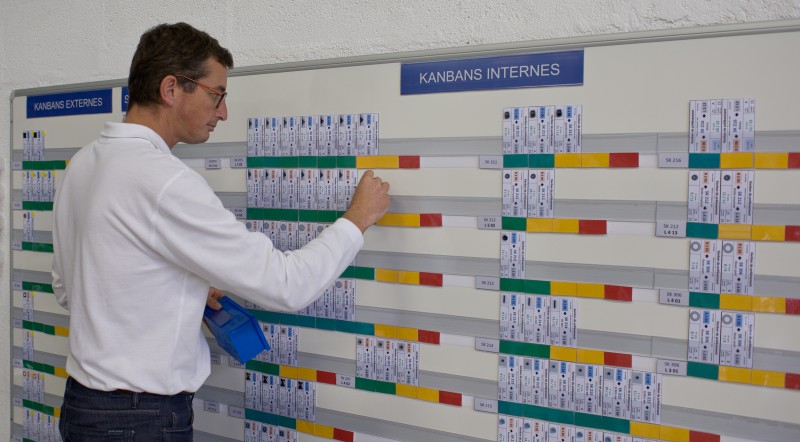
Ultimately, Toyota saw that this method eliminated the need for high inventories that drive up costs. Kanban was then created and implemented into many manufacturing operations within Toyota and became a way to avoid the production of excess parts if they are not immediately needed. Now that we know how Kanban originated, what are some of the benefits that Kanban can provide for project management?
Five Benefits of Kanban for Project Management
Listed below are the five ways that Kanban is easily able to benefit project management within your operation:
- Versatility - The entire idea behind Kanban is effectively communicating visual signals as well as the benefits that span industries and job titles. Kanban methodology is universally applicable and is able to be implemented by every team in your company from engineering to marketing. Versatility makes it much simpler for team members and projects to move seamlessly across functions, which will enhance your overall operation as a whole.
- Continuous Improvement - Continuous improvement is one of the most important and key concepts within lean and Kanban. As stated by lean methodology and Toyota, there is always room for improvement. One of the guiding principles of Kanban is that everyone should be focused on continuous improvement. Kanban’s visual system of project management makes it much easier to review processes and make improvements that cut waste and reduce overhead within an operation.
- Increased Output - As well as continuous improvement within an operation, Kanban also encourages teams to limit how much work they have in progress at any time, a concept that is commonly referred to as WIP (work in progress). Limiting WIP encourages teams to work together to effectively move across the finish line and eliminate the distraction of multitasking. This enhanced collaboration and intense focus allow teams that practice Kanban to accomplish much more.
- Team Empowerment - Team empowerment is another concept that is important within Kanban methodology. Kanban ensures that the entire team shares responsibility for moving work toward the end-zone and empowers teams to make much more agile decisions that move projects forward.
- Enhanced Product - Kanban focuses on continuous improvement and agile responsiveness to issues often and means that projects that are seen through to completion have fewer errors and require much less work. This puts quality control back into the project management process, ultimately yielding more accurate outcomes.
Utilizing Kanban within project management can easily enhance your overall operation and improve overall effectiveness. A software that can aid within the Kanban methodology is PlanetTogether’s Advanced Planning and Scheduling (APS) Software. APS software can easily be implemented into Kanban operations as well as ERP, MPS, and MRP software operations as well. Manufacturers and project managers are reaping the benefits of utilizing Kanban and APS software and are developing a competitive edge against other organizations as well.
Advanced Planning and Scheduling (APS) software has become a must for modern-day manufacturing operations due to customer demand for increased product mix and fast delivery combined with downward cost pressures. APS can be quickly integrated with a ERP/MRP software to fill gaps where these system lack planning and scheduling flexibility and accuracy. Advanced Planning and Scheduling (APS) helps planners save time while providing greater agility in updating ever-changing priorities, production schedules, and inventory plans.
Implementation of PlanetTogether's Advanced Planning and Scheduling (APS) software will take your manufacturing operations to the next level of production efficiency, taking advantage of the operational data you already have in your ERP.
Video: Using and Comparing What-If Scenarios in PlanetTogether APS
What-if scenarios in PlanetTogether APS let you go beyond static Kanban boards and spreadsheets. Instead of guessing how a change will affect your projects or production plan, you can clone the current schedule, adjust priorities, quantities, or resource assignments, and compare multiple options side by side.
- In this video, you’ll learn how to:
– Create what-if scenarios from your current live schedule in PlanetTogether APS
– Change priorities, due dates, order quantities, or resource capacity in each scenario
– Analyze the impact on key KPIs such as on-time delivery, lead time, WIP, and resource utilization
– Compare multiple scenarios to find the best balance between flow, capacity, and due dates
– Safely publish the chosen scenario back to the live schedule so Kanban boards and production stay in sync
This video is ideal for production planners, schedulers, and project managers who use Kanban and want APS to help them make confident, data-driven scheduling decisions.
Key takeaways from this video:
- How PlanetTogether APS lets you quickly create what-if scheduling scenarios
- How to see the impact of schedule changes on capacity, lead time, and on-time delivery
- How to compare scenarios side by side using KPIs and visual schedules
- How publishing the best scenario to the live plan reduces firefighting, multitasking, and bottlenecks
Don’t Let Your Planning Process Break Your Kanban Flow
A Kanban board makes work visible—but it doesn’t guarantee that you’re running the right work, in the right order, at the right time. If planning still happens in spreadsheets, you can end up with overloaded resources, stalled cards, and constant firefighting, even though the board looks “organized.”
Download our one-page “The Money Is in the Planning” infographic to see how gaps in planning and scheduling quietly erode project and production performance through:
- Bottlenecks that delay high-priority work
- Excess WIP and multitasking that slow everything down
- Overtime, expediting, and hidden costs
- Underused capacity on non-bottleneck resources
Use it as a quick checklist with your team to connect Kanban + APS—so your visual workflow and your actual production schedule are pulling in the same direction.
