Quick Answer: What Is Master Production Scheduling (MPS)?
Master Production Scheduling (MPS) is a time-phased plan that translates demand into what you’ll produce and when, balancing inventory targets, lead times, and available capacity. A strong MPS improves visibility across teams, stabilizes production by exposing constraints, and supports more reliable order promising. When variability is high, APS can help keep MPS feasible by aligning material signals with constraint-based schedules.
What Is an MPS in Manufacturing? (Key Inputs and Outputs)
The Master Production Scheduling (MPS) is a detailed plan of the production over a certain period of time. It plans manufacturing by taking into account consumer demand, capacity planning, material flow, and inventory planning. Typically, an MPS is created by the use of software with manual adjustments from planners and schedulers.

While a production planning software only accounts for consumer needs and demands, a master production scheduling software also takes into consideration capabilities and constraints pertaining to the entire manufacturing operation.
A Master Production Schedule is a great solution for organizations wishing to synchronize their operations and become more efficient. MPS has become vital for many manufacturing operations as its advantages result in a boost in efficiency and an increase in profits for the operation.
Benefits of Master Production Scheduling (MPS)
A few of the advantages of master production scheduling (MPS) include:
-
MPS Improves Cross-Functional Communication
One of the main benefits of a master production schedule is that it serves as a communication tool between manufacturing and the rest of the organization. The output of MPS provides concise information about all manufacturing plans to allow everyone in the organization to have visibility in the plan for production.
Decision Framework: When MPS Is Enough vs. When APS Is Needed
Use this quick fit check to decide whether your operation can run effectively on an MPS alone—or needs APS to keep the master schedule executable.
MPS is usually enough when:
- Demand and priorities are relatively stable over the planning horizon.
- Lead times and routings are reliable, and capacity issues are occasional—not constant.
- You mainly need a shared plan for communication, supply prioritization, and order promising.
Add APS when:
- Bottlenecks, setup/changeovers, or shared labor routinely break the plan.
- You need fast re-planning when demand shifts or a constraint appears.
- You want to compare scenarios (sequence changes, alternate resources, expedites) before committing.
Life will be easier for any manufacturer who chooses PlanetTogether; it's an efficient scheduler, plain and simple.
PRODUCTION SCHEDULER, FOOD INDUSTRY
How APS Makes MPS Executable (Materials + Capacity Planned Together)
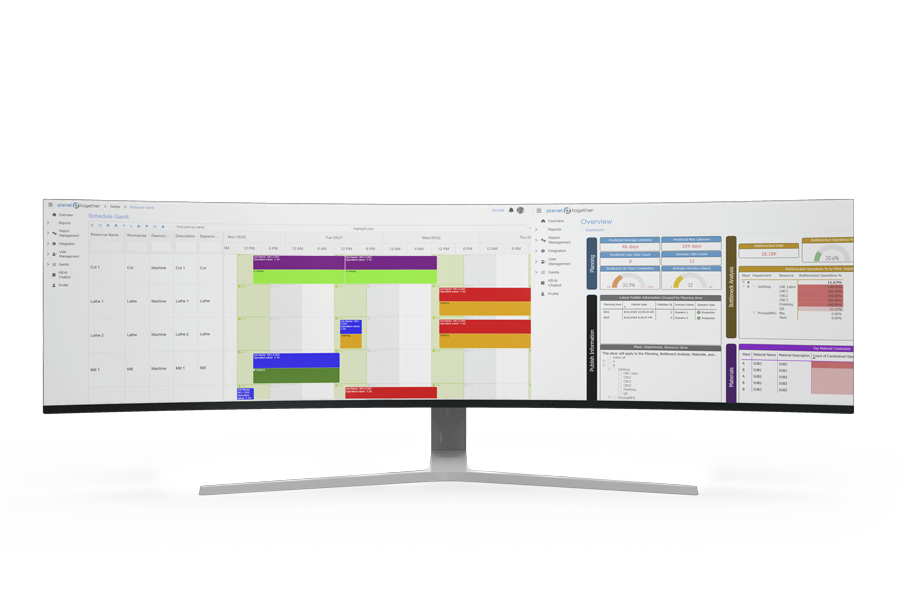
Advanced Planning and Scheduling (APS) software helps manufacturers turn a master production schedule into an executable plan by coordinating materials and capacity together. Unlike traditional planning tools that primarily reflect demand, APS supports MPS by incorporating shop-floor capabilities and constraints—so planned output aligns with what can actually be produced.
PlanetTogether’s APS includes an MPS/MRP function designed to streamline master scheduling. With a “single-click” MPS/MRP process, PlanetTogether can pull data directly from your ERP system and plan material and capacity concurrently to build a realistic production schedule that improves visibility, stabilizes production, and supports more reliable order commitments.
What-If Scenario Planning: Test Changes Before You Commit
When demand shifts, a bottleneck resource goes down, or a priority order gets pulled forward, most schedules don’t need a quick edit—they need a realistic re-plan. This video explains how what-if scheduling scenarios work in Advanced Planning & Scheduling (APS) and how comparing alternatives helps teams choose the best path for throughput, on-time delivery, and capacity utilization.
Designed for production schedulers, planners, and operations leaders, the walkthrough focuses on the practical questions that matter on the plant floor: What happens if we change the sequence? Move work to a different resource? Expedite one order—what becomes late? The goal is to make tradeoffs visible so decisions are based on constraints, not guesswork.
It also connects scenario comparison to day-to-day planning workflows—especially when you’re aligning schedules to a Master Production Schedule (MPS) and need a faster way to evaluate changes without rebuilding everything manually. PlanetTogether APS is positioned to support this with integrated planning inputs and scenario-driven decision making.
Spreadsheet Scheduling vs. APS: Time Impact Benchmarks (Infographic)
What-if scenarios are only useful if you can run them quickly. But when scheduling lives in spreadsheets, scenario comparison turns into a slow loop of chasing updates, copying jobs, and reworking plans—so decisions arrive late and the shop floor runs on outdated priorities.
Download our Spreadsheet vs. APS Scheduling Infographic to see a clear, side-by-side view of how much time teams typically spend just keeping schedules current—and what changes when scheduling is purpose-built for manufacturing execution and re-planning.
What readers will take away (benchmarks at a glance):
- Refresh planning data: 1–5 min vs 1–2 hr
- Optimize the schedule: 1–5 min vs 1–2 hr
- Adjust schedules for what-if scenarios: 30–60 min vs 1–2 hr
- Communicate schedules to production: 1–5 min vs 1–2 hr
Total daily planning impact: ~1 hour/day vs ~8 hours/day

MPS FAQs
1) What is included in a master production schedule (MPS)?
An MPS typically defines which finished goods (or key SKUs) will be produced, in what quantities, and on what dates—based on demand signals, inventory targets, and capacity assumptions.
2) What’s the difference between MPS and MRP?
MPS sets the production plan for finished goods over time. MRP translates that plan into time-phased material requirements—what to buy or make and when—to support the schedule.
3) How does MPS improve order promising?
MPS improves order promises by showing what’s already committed and what capacity remains, helping teams quote lead times without overloading critical resources.
4) Why do MPS plans fail on the shop floor?
MPS plans break down when real constraints—bottlenecks, labor limits, setup times, downtime, or material readiness—aren’t reflected accurately, or when priorities change faster than the schedule can be updated.
5) When should manufacturers use APS with MPS?
Use APS when you need to keep MPS feasible under real constraints and re-plan quickly—especially during demand shifts, bottleneck disruptions, expediting decisions, or frequent changeovers.
Ready to keep your MPS feasible when constraints and priorities change? Request a PlanetTogether APS demo.