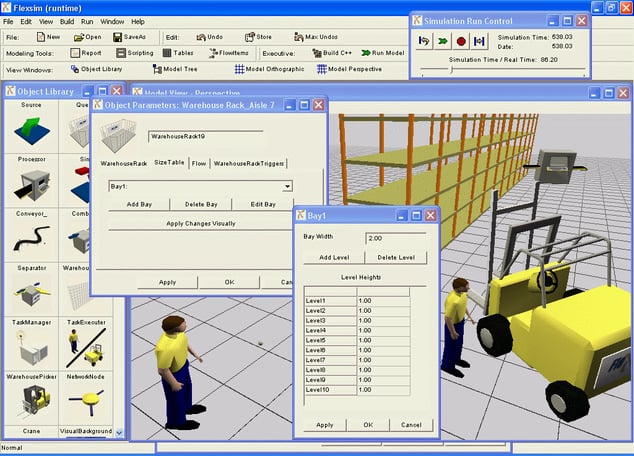
When it comes to optimizing your manufacturing process, seeing is believing. FlexSim is a simulation software that models, simulates, predicts, and visualizes manufacturing systems and logistics. The visual user interface of this software visualize makes it easy to optimize these systems for any industry. Industries such as manufacturing, material handling, healthcare, and packaging utilize this simulation software to increase efficiency and plan for growth without wasting energy on the shop floor.
Simulation software gives businesses the problem-solving tools they need to determine whether or not proposed changes to their manufacturing process are appropriate for them. Founded in 1993, FlexSim works to maintain their status as a leader in cutting edge discrete event simulation technology. Their software products
With simulation, shop floor managers never waste energy or time on the factory floor implementing changes. It improves manufacturing efficiency, increasing workplace morale across the board.
Simulation software like FlexSim provides you with all the visual data required to answer questions or make decisions that otherwise might be too costly or risky. For example, “what if” scenarios help companies visualize the consequences of new equipment additions or an increase in employees. Simulation software takes this data and visualizes the hypothetical process before your very eyes.
Who Uses FlexSim?
FlexSim simulation software supports engineers, managers, and decision makers looking to validate, improve or learn more about their planned processes. In the manufacturing industry, simulation enables users to optimize floor space, alleviate bottlenecks, minimize machine downtime, decrease operator idle time, and reduce inventory. International, multi-facility companies, like Honda, Gillette, Coca-Cola, use FlexSim simulation software.
FlexSim's spatial, drag-and-drop capabilities make PlanetTogether's Advanced Planning and Scheduling Software even easier to use.
Video: What-If Scenario Planning in PlanetTogether APS
When you are evaluating changes to your manufacturing system, spreadsheets and rough calculations are rarely enough. In the same way that simulation tools like FlexSim visualize “what-if” scenarios for layouts, staffing, and new equipment, PlanetTogether Advanced Planning & Scheduling (APS) lets you run what-if scenario planning for your production schedules before anything changes on the shop floor.
In this video, you’ll see how PlanetTogether APS helps you:
- Build and compare multiple schedule scenarios when demand, capacity, or constraints change
- Test the impact of new orders, rush jobs, additional equipment, or staffing changes on throughput and due dates
- Use Gantt-based, drag-and-drop scheduling alongside APS logic so every scenario respects real constraints and material availability
- Replace trial-and-error on the factory floor with data-driven, simulation-like planning, reducing risk, waste, and disruption
This video is ideal for operations managers, industrial engineers, and production planners who want to couple what-if analysis with advanced production scheduling—complementing discrete-event simulation tools like FlexSim with day-to-day, executable APS schedules.
Bridge the Gap Between Simulation and Your Daily Schedule
Simulation tools like FlexSim help you answer critical “what-if” questions—what if we add a new machine, change the layout, or increase staffing? You can model, simulate, predict, and visualize the impact of those changes on your manufacturing system without risking time or money on the shop floor.
The next step is turning those simulated insights into a daily production schedule your team can actually run. That’s where Advanced Planning & Scheduling (APS) comes in.
Download our Before-and-After Scheduling Infographic to see how moving from manual or spreadsheet-based planning to APS-driven scheduling helps you:
- Turn validated simulation results into executable production plans
- Close the loop between what-if analysis and the real schedule on your factory floor
- Reduce waste and idle time by aligning capacity, materials, and constraints in one visual schedule
- Support better decisions by giving planners and managers a clear “before vs. after” view of schedule performance
- Use the operational data in your ERP/MRP to drive continuous improvement instead of one-off experiments
Share it with your engineering, planning, and operations teams as a quick visual guide to how simulation + APS creates a powerful, low-risk way to optimize your manufacturing system.
