When utilizing advanced planning and scheduling software, there are various capabilities and benefits that can improve production tremendously.  These benefits include improved delivery performance, profit boost, inventory reduction, waste minimization, and others. In order to experience these benefits, it is important to utilize the best combination of tools. One of the most common and advantageous combinations of scheduling tools include gantt drag and drop and inventory planning.
Gantt Drag and Drop
One of PlanetTogether’s unique features within the software is the Gantt drag-and-drop tool. This feature generates production schedules that can be easily comprehended and interpreted. 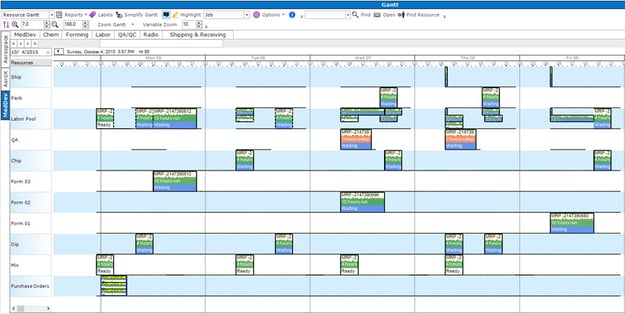 While the planning process is challenging enough, the Gantt Drag and Drop tool allows you to easily move portions of the schedule around while leaving production unchanged. This accounts for any swift changes within the facility that are needed to ensure a steady flow of production. Some of the benefits of the PlanetTogether Gantt Drag and Drop tool include:
- On-time Delivery
- Scheduling Precision
- Overall Process Control
- Cost Effective/Material Planning
Gantt drag and drop is a crucial component within production facilities that enable production to complete mixed resource production tasks. Gantt charts are commonly used in project and production timeline and resource management, where project planning and a multitude of interdependent tasks to be sequenced on one timeline.
Inventory Planning
The inventory planning portion of the software showcases how much inventory is available within a certain time period. Within a set time period, inventory will slowly diminish, ultimately enabling the manufacturer to come up with a solution for that production period. Inventory planning also issues warnings that let the facility know the status of inventory:
- Shortage - Shortage will be highlighted in red and represents when the item in inventory is below safety stock level.
- Below Safety Stock - The item will be highlighted in yellow and informs schedulers when the item is below safety stock.
- OK - This will be highlighted in green and represents when an item is above safety stock and plentiful enough to handle incoming demand.
- Above Max Inventory - The item is marked as above max inventory in orange and represents an item that is overstocked, creating more cost.
This feature allows manufacturers to have clear insight within inventory and develop a proper plan.
Video: What-If Scenarios in PlanetTogether APS for Production Scheduling
In this video, you’ll see how PlanetTogether Advanced Planning & Scheduling (APS) uses what-if scenarios to compare different production schedules before you commit changes to the shop floor. Instead of relying on static spreadsheets, PlanetTogether lets you test alternative sequences and resource assignments using the same tools highlighted in this blog—Gantt drag-and-drop scheduling and inventory planning.
Watch how planners can:
– Use the Gantt drag-and-drop view to visually move jobs, close gaps, and adjust sequences in seconds while APS maintains constraints and material availability
– Combine Gantt changes with inventory planning, seeing when items fall below safety stock or exceed max inventory so you avoid shortages and overstock
– Run multiple what-if scenarios to compare delivery performance, inventory levels, and capacity utilization before finalizing the schedule
– Support core APS benefits—improved delivery performance, profit boost, inventory reduction, and waste minimization—by choosing the best scenario, not just the first one
See the Before-and-After Impact of APS on Your Production Schedule
When you combine Gantt drag-and-drop with inventory planning inside Advanced Planning & Scheduling (APS), you move from reacting to problems to proactively designing better production schedules. That shift delivers the benefits highlighted in this blog—improved delivery performance, a boost in profit, inventory reduction, and waste minimization—but it can be hard to visualize what that change really looks like.
Download our Before & After Scheduling Infographic to see how moving from manual or spreadsheet-based planning to PlanetTogether APS helps you:
- Replace static schedules with a Gantt drag-and-drop view that makes production easier to understand and adjust
- Use the inventory planning view to monitor safety stock, shortages, and overstock situations in real time, instead of discovering issues after the fact
- Build production scenarios that balance on-time delivery, capacity utilization, and inventory levels—then choose the best one with what-if analysis
- Turn your existing ERP/MRP data into a schedule that actually supports your goals for lead time, cost, and service
Share this one-page infographic with your planning, operations, and leadership teams as a quick visual guide to how APS + Gantt + inventory planning can transform your production planning “before” into a far better “after.”
