It is safe to say that the times we are living in are rather interesting, especially for supply chain as a whole. Manufacturers may be experiencing a sharp increase in demand, logistics and distribution are having a difficult time keeping up and being efficient, and the overall process as a whole is under tremendous strain. This is especially true for food manufacturers, with the excessive buying that supermarkets and stores such as Walmart and Kroger are experiencing.
The circumstances that we are experiencing are completely left-field and there was not an adequate plan developed by many manufacturers for a situation such as this. As supply chain players are either experiencing sharp increases or decreases and demand is rather volatile, locating the most advantageous production plan for your facility is an absolute necessity. A software that is able to aid with this concept is PlanetTogether’s Advanced Planning and Scheduling (APS) Software, in which the software enables you to quickly change your production process with ease.
As the coronavirus continues to shape and redefine the way we live, reconstruction and reconnecting of supply chains is going to be a substantial topic once this the pandemic has ended. This is also why developing an adequate, quick, and efficient plan with APS can aid with not only the changing demand in this moment, but for future rapid changes down the road. Two particular features that can aid with any potential volatile changes is Gantt Drag and Drop and What-If Scenarios. Each of these features offer thorough insight and visibility into locating the absolute most advantageous production plan and eliminating inefficient costs within your operation.
Gantt Drop and Drop in Advanced Planning and Scheduling (APS)
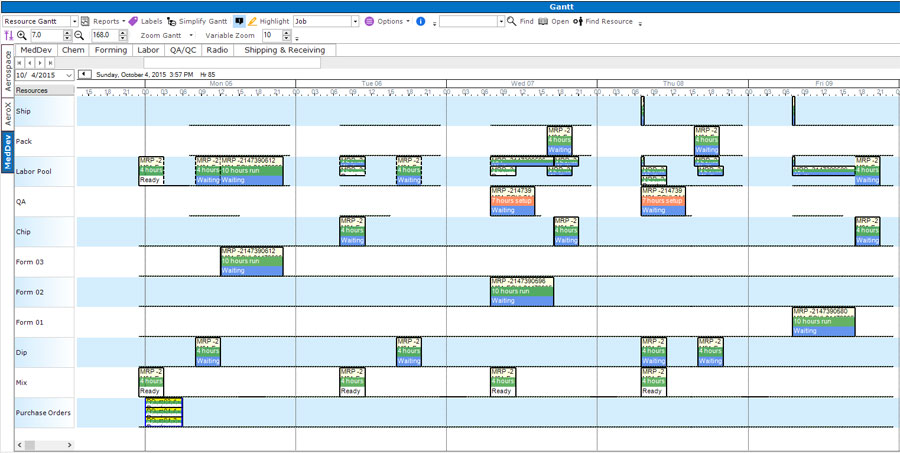
A feature that many users of APS are taking advantage of is Gantt Drag and Drop, due to the simplicity of the feature. Gantt Drag and Drop’s simplicity is by far one of the most beneficial and substantial features, in which it eliminates the need to look at spreadsheets or manually enter numbers. At times, you may not even need to write a title or header for the assignment. You are able to place the cursor where you want your task to start and release it where you wish for it to end.
This ability to reallocate with ease ensures for quick and efficient production scheduling/rescheduling. It also allows for a visual representation of your production process and how the changes will impact the process as a whole, ultimately enabling thorough visibility and allowing you to make significant financial and operational decisions rather quickly. Gantt Drag and Drop is a stand out feature of APS and is becoming a quickly implemented feature on a frequent basis during this period of uncertainty.
What If Scenarios in Advanced Planning and Scheduling (APS)
In correlation with Gantt Drag and Drop, "What if?" Scenarios are another substantially beneficial tool that manufacturers should take advantage of during this time. Uncertain about how changes within the production process will be altered if you were to switch up the schedule? What-If scenarios demonstrate how production will be altered before you actually make the final switch. What-If Scenarios allow you to move tasks and jobs around and ultimately provide insight and a visual representation of an advantageous schedule, which will be placed utilizing Gantt Drag and Drop. This process enables you to enhance your facility through bottleneck elimination, efficiency enhancement, and ultimately cost reduction.
PlanetTogether’s Advanced Planning and Scheduling (APS) Software is being implemented into operations around the globe and is greatly aiding with the fight against the coronavirus. With demand uncertainty on the rise, APS software is able to aid with the uncertainty and ultimately come up with the most advantageous production plan for your operation. APS allows you to maintain your competitive edge and keep up with much larger manufacturers that are protected during recessions and crises, such as the one we are experiencing now. Implement APS software and reap the benefits associated with the features and take your operation to the next level.
Advanced Planning and Scheduling Software
Advanced Planning and Scheduling (APS) software has become a must for modern-day manufacturing operations due to customer demand for increased product mix and fast delivery combined with downward cost pressures. APS can be quickly integrated with ERP/MRP software to fill gaps where these systems lack planning and scheduling flexibility and accuracy. Advanced Planning and Scheduling (APS) helps planners save time while providing greater agility in updating ever-changing priorities, production schedules, and inventory plans.
- Create optimized schedules balancing production efficiency and delivery performance
- Maximize output on bottleneck resources to increase revenue
- Synchronize supply with demand to reduce inventories
- Provide company-wide visibility to capacity
- Enable scenario data-driven decision making
Implementation of Advanced Planning and Scheduling (APS) software will take your manufacturing operations to the next level of production efficiency, taking advantage of the operational data you already have in your ERP.
Watch: Multi-Plant Production Scheduling with PlanetTogether APS
See how PlanetTogether APS handles multi-plant production scheduling using a visual Gantt chart and drag-and-drop rescheduling. This “MultiPlant 101” video shows how planners balance capacity across sites, react to sudden demand changes, and keep every plant aligned to one real-time schedule.
See How a Snack Manufacturer Used APS to Turn Volatile Demand into a Clear Plan
When demand spikes and priorities change by the hour, planners cannot afford to live in spreadsheets. In the Snak-King case study, a fast-growing snack manufacturer used PlanetTogether APS to cut changeovers, coordinate two plants, and keep production synchronized with real-world demand—without sacrificing efficiency or service levels.
If you are constantly reshuffling orders, lines, and materials, this story shows what happens when a visual Gantt schedule and multi-plant planning engine work together.
See how Gantt-based drag-and-drop scheduling and what-if scenarios helped Snak-King respond to demand volatility and increase throughput.

Ready to See Gantt Drag-and-Drop Scheduling in Your Own Operation?
This blog showed how Gantt drag-and-drop and what-if scenarios make it easier to reschedule on the fly, respond to demand shocks, and protect efficiency—even in highly volatile environments. With PlanetTogether APS, planners simply drag jobs on the Gantt chart and instantly see the impact on capacity, bottlenecks, and delivery performance.
In a live demo, we will walk through your world—your lines, constraints, and demand patterns—and show how PlanetTogether can:
- Replace spreadsheet-based schedules with a visual, finite-capacity Gantt plan
- Support rapid rescheduling and what-if analysis during demand spikes or disruptions
- Coordinate multiple plants or lines from one real-time schedule
- Integrate with your existing ERP/MRP so data flows automatically into and out of APS

See how fast your team could react to the next disruption with Gantt-based drag-and-drop scheduling and real-time what-if scenarios.