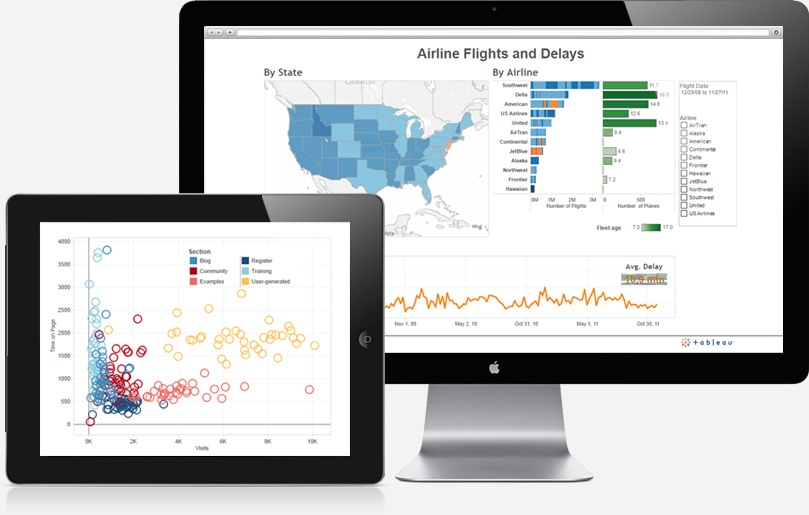
Business intelligence (BI) software transforms unorganized data from a variety of sources into reports, graphs and tables that reveal business insights. Displays that are interactive and provide a visual (read: easy to understand) relationship between data sets are invaluable in business operations and client dealings. Tableau is a software that can manipulate unstructured data and present analyses into charts, tables, and visual formats.
Based on user reviews, Tableau Desktop Software is the highest performer in the BI space. The key reason to use business intelligence software is that it enables both an overview and a detailed breakdown of how aspects of business are performing and affecting one another. Easily set KPIs for tracking and measuring success for insight on how to modify a process moving forward.
Tableau is sensitive to both the need for sophisticated code that will speak to a company's IT department intelligently and the need for non-IT users to be able to run queries and analysis directly to get to business insights. The product offers the following strengths:
- Fast Analytics
- Data takes only minutes to manipulate into meaningful analyses and clear data discovery
- Ease of Use
- Large or Small Amounts of Data
- All types of data, from spreadsheets to full databases will work within Tableau's environment
- Smart Dashboards
- More than one view of data provides deeper business insights
- Automatic Updates
- Updates can be done in real time online or on a customer-defined schedule.
- Share Analyses Easily
- Built-in sharing on the web and mobile devices
Industry influencers agree that business intelligence tools that provide predictive and prescriptive analysis to a large population of administrators are the future. Standard, static, reports are no longer enough for fast moving businesses that need to adapt to changing environments quickly. Tableau software stores an entire database of information in random access memory (i.e., nearer to the processor) for something called "in-memory" technology. This technology enables faster, real-time analysis to assist with critical decision-making. Because of its visual format, users can quickly identify outliers to data sets and implement new strategies, offering a fundamentally superior technique for dealing with unexpected problems.
Tableau integrates with popular business applications, such as Salesforce, making it intuitive, and providing additional insight into established operational practices. It also renders information onto tablets and smartphones, giving the user the capability of making modifications while mobile. It also has a reasonable pricing model that keeps it within reach of most company budgets.
Video: Navigating PlanetTogether APS for Data-Driven Decisions
In this video, you’ll learn the basic navigation of PlanetTogether Advanced Planning & Scheduling (APS) and how to move through the screens, views, and menus you will use every day. Once you understand how to get around the system, you can combine APS with business intelligence tools like Tableau to turn unorganized data into interactive dashboards, KPIs, and scheduling insights.
We walk through how to:
– Open and navigate key APS workspaces used for planning and scheduling
– Access the data APS sends to Tableau and other BI tools for fast analytics and smart dashboards
– Use APS views alongside BI visualizations to track performance, spot outliers, and support predictive and prescriptive decision-making
– Share insights with operations, IT, and business leaders so everyone is working from the same visual story of your data
This video is ideal for new PlanetTogether users, planners, and analysts who want to quickly become comfortable in APS and then leverage Tableau business intelligence for deeper analysis and better decisions.
Turn Business Intelligence into Better Planning & Scheduling
Business intelligence software like Tableau makes it easier to see what is happening in your organization by transforming unorganized data into interactive dashboards, KPIs, and visual reports. But insight alone is not enough—those analytics need to feed directly into your planning and scheduling process to improve throughput, cost, and service.
Download our one-page “The Money Is in the Planning” infographic to see how combining BI tools with PlanetTogether APS can help you:
- Turn dashboards and KPIs into concrete production and capacity decisions
- Use predictive and prescriptive analytics to adjust plans before small issues become major problems
- Align operations, IT, and business leaders around a single, visual picture of performance
- Connect data from ERP, spreadsheets, and other systems into one planning environment that actually moves the needle on cost and profitability
Share it with your operations, analytics, and leadership teams as a quick visual guide to where better planning and scheduling turn business intelligence into real operational and financial results.
