Quick Answer: Is Drag & Drop Scheduling Enough for Manufacturing?
Drag and drop scheduling is useful because it makes production schedules easier to see and adjust. But by itself, it can fall short when planners need detailed rules, capacity checks, material awareness, and fast what-if analysis. APS adds those controls so teams can build schedules that are both visual and executable.
Drag-and-drop scheduling makes production schedules easier to build and adjust. Planners can move jobs on a timeline, change sequence quickly, and see the effect right away.
That is a clear improvement over pen-and-paper planning or spreadsheet-based scheduling. In an APS environment, drag-and-drop becomes more useful because planners can change the sequence from a grid or Gantt view and see how that change affects the rest of the schedule.
Before choosing a planning tool with drag-and-drop functionality, manufacturers should understand where the feature helps, where it falls short, and when APS adds more control.
Advantages of Drag & Drop Scheduling in Manufacturing
Drag-and-drop scheduling helps planners work faster and see the schedule more clearly. Its value is not just convenience. It helps teams resequence work quickly, spot issues sooner, and make schedule changes with less effort.
Simplicity
One of the biggest advantages of drag and drop scheduling is simplicity. Planners do not need to type every time change by hand or rebuild a schedule in a spreadsheet. They can move a job, place it where it should start, and update the sequence quickly.
That makes the scheduling process easier to use and easier to review.
Reallocate With Ease
Drag-and-drop also makes it easier to move work between resources. If a job can run on another machine or line, planners can shift it and see the new position on the schedule.
In PlanetTogether, that visual move is more useful because the system can also show which resources are capable of doing the work.
Schedule Visibility
Another major benefit of drag-and-drop scheduling is visibility. It helps teams see the production plan, spot bottlenecks, and understand how work is flowing across resources.
That visual view can make it easier to catch material shortages, idle gaps, and late work orders before they create bigger problems.
Disadvantages of Drag and Drop Scheduling in Manufacturing
Drag-and-drop scheduling is helpful, but it is not enough on its own for every plant. The same speed that makes it attractive can also create risk when planners need more detail, stronger rule checks, and better control over real constraints.
Lacks Detail
A visual move does not always show the full planning picture. If planners drag jobs around without checking the details, they can end up with a schedule that looks right but is not ready to run.
That is why it helps to use tools that provide both a Gantt chart and more detailed planning views.
Can Be Complex With Lots of Data
Drag-and-drop works well when the schedule is manageable. But when plants are dealing with large job counts, many constraints, or frequent changes, manual movement can become slow.
In those cases, planners often need bulk changes, stronger automation, and faster ways to evaluate options.
Editing is Still a Factor
Visual scheduling is easy to use, but it is also easy to make mistakes. Planners still need to confirm task duration, machine capability, and material readiness before releasing the job.
That is where Advanced Planning and Scheduling (APS) software becomes more valuable. It helps prevent schedule changes that create impossible or incomplete production plans.
When Drag & Drop Scheduling Works Best
Drag-and-drop scheduling works best when planners need fast visual resequencing and clear schedule visibility. It is especially useful for teams that want to move beyond scheduling using spreadsheets but still need an intuitive way to adjust work.
Its value increases when it is paired with finite scheduling, material checks, and what-if scenarios inside APS. That combination gives planners the speed of visual scheduling without losing control over real constraints.
Life will be easier for any manufacturer who chooses PlanetTogether. It’s an efficient scheduler, plain and simple.
JAIME OZUNA, PRODUCTION SCHEDULER, ATLANTIC COFFEE
Advanced Planning & Scheduling (APS) Software
Advanced Planning & Scheduling (APS) software helps manufacturers go beyond visual changes and build schedules that are realistic enough to run.
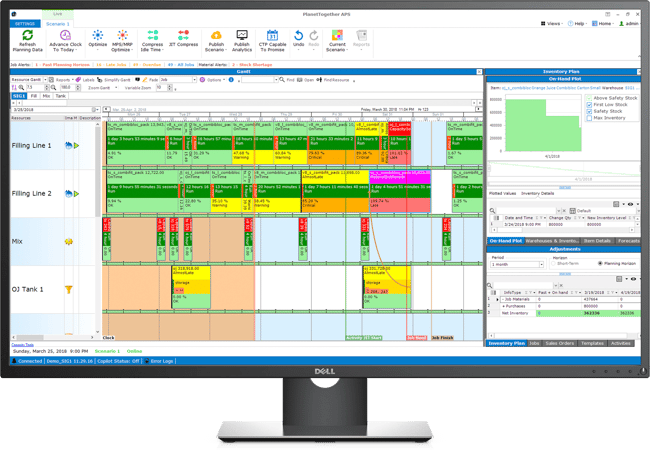
PlanetTogether APS provides a visual Gantt chart with drag-and-drop that allows planners to change sequence quickly while still respecting real planning rules. That means the schedule is not just easy to move. It is easier to trust.
APS systems can be quickly integrated with ERP/MRP software so planners can use current operational data to improve scheduling flexibility, speed, and accuracy.
With PlanetTogether APS you can:
- create optimized schedules that balance production efficiency and delivery performance
- maximize throughput on bottleneck resources
- synchronize supply with demand to reduce inventories
- provide company-wide visibility to resource capacity
- enable scenario data-driven decision making
Decision Framework: Should You Stay Visual Only or Add APS?
Use drag and drop scheduling when the main goal is fast visual resequencing.
Add APS when one or more of these are true:
- capacity limits affect schedule quality
- material availability changes the plan
- resource capability rules matter
- planners need what-if scenarios before releasing the schedule
If the schedule must be both visual and reliable, APS is usually the better fit.
Video: What-If Scenarios with Gantt Drag-and-Drop Scheduling in PlanetTogether APS
In this video, you’ll see how PlanetTogether APS combines Gantt-based drag-and-drop scheduling with what-if scenarios so planners can test changes before releasing them to the floor.
Instead of relying on manual changes alone, planners can move jobs, compare options, and see the effect on due dates, bottlenecks, and resource loading in one place.
This video is especially useful for schedulers and operations teams that want a more realistic visual planning process.
See the Before-and-After Impact of Drag-and-Drop Scheduling with APS
Drag-and-drop scheduling makes the schedule easier to see and adjust. But the real value appears when those visual changes are supported by APS logic that understands capacities, materials, and constraints.
Download the Before & After Scheduling Infographic to see how drag-and-drop scheduling in PlanetTogether APS can help your team:
- Replace reactive spreadsheet updates with a single Gantt view
- Re-sequence and reassign jobs while APS checks capacity and material availability
- Spot bottlenecks, shortages, and idle gaps sooner
- Use what-if scenarios to compare schedule options before releasing changes
- Turn ERP/MRP data into a more reliable visual production plan
Share this infographic with your planning and operations teams as a quick way to show how Gantt + drag-and-drop + APS improves scheduling decisions.

FAQs About Drag & Drop Scheduling
What is drag-and-drop scheduling in manufacturing?
Drag-and-drop scheduling lets planners move jobs on a timeline or grid to adjust the sequence and start times visually.
What is the main advantage of drag-and-drop scheduling?
The main advantage is speed and visibility. It helps planners resequence work quickly and see the effect on the schedule right away.
What is the main disadvantage of drag-and-drop scheduling?
The main disadvantage is that visual changes alone do not always reflect real constraints like capacity, materials, labor, or machine capability.
How does APS improve drag-and-drop scheduling?
APS adds finite scheduling, material checks, resource rules, and what-if analysis so drag-and-drop changes produce more realistic schedules.
When should a manufacturer move beyond spreadsheets and basic drag and drop scheduling?
A manufacturer should move beyond those tools when scheduling changes often, resource constraints matter, and planners need faster decisions with less manual checking.
See PlanetTogether APS in Action
See how PlanetTogether APS helps manufacturers turn visual scheduling into a more reliable production plan. Request a free APS demo to see how drag-and-drop, finite scheduling, and what-if analysis work together in one system.