Quick Answer: Scheduling Optimization in Dynamic Production Environments
Scheduling optimization helps manufacturers build schedules that can adjust when demand, materials, machines, or labor change. It connects plant constraints with current ERP, SCM, and MES data. As a result, planners can reduce idle time, protect due dates, and test schedule tradeoffs before work reaches the floor.
Dynamic production environments change every day. Orders move. Machines go down. Suppliers miss dates. Labor changes by shift. Therefore, the schedule needs to reflect real conditions, not just the original plan.

The Challenge of Dynamic Production Environments
Dynamic production environments make scheduling harder because constraints keep changing. A schedule that worked yesterday may fail today if demand shifts, labor is short, a supplier is late, or a machine goes down.
Static schedules struggle because they do not adjust fast enough. Manual updates also slow the team down. For example, a rush order may look simple in ERP. However, it may overload a bottleneck or consume parts needed for another job.
Therefore, planners need a way to see the impact of each change before they release work to the floor.

The Role of Scheduling Optimization
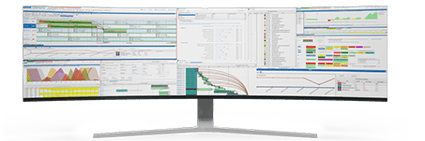
Scheduling optimization turns plant data into a schedule the floor can run. The goal is not a perfect-looking plan. The goal is a plan that respects real constraints.
A useful schedule weighs setup time, labor, materials, due dates, changeovers, and capacity. It can also support reducing inventory levels without starving the floor.
A stronger process connects production scheduling software like PlanetTogether with ERP, SCM, and MES systems. These integrations bring orders, inventory, supply, and shop floor events into planning. As a result, the schedule can reflect what is happening now.
Integration with ERP Systems
ERP systems manage orders, inventory, purchasing, and cost data. However, ERP data alone may not show finite capacity. APS uses ERP data and checks it against machines, labor, materials, and due dates.
For example, SAP ERP data can help planners see orders and stock. Then APS can build a schedule that fits available materials and real capacity.
Integration with SCM Systems
SCM systems help teams see supplier risk and demand changes. When supply data feeds the schedule, planners can react before a shortage stops work.
For instance, what-if simulations let planners test late parts, demand spikes, or alternate sources. Then they can compare cost, output, and due dates before they commit.
Integration with MES Systems
MES systems show what is happening on the shop floor. They can show machine status, labor activity, quality issues, and job progress. When this data reaches APS, planners can act faster.
MES data can help planners identify bottlenecks and adjust the plan around real limits. This helps the team protect flow before delays spread.
Decision Framework: When Scheduling Optimization Needs APS
Use basic scheduling when demand is stable and constraints are simple. Use APS when the plan must respond to orders, materials, machines, labor, and suppliers at the same time.
- Use APS when downtime changes due dates.
- Use APS when late parts force resequencing.
- Use APS when planners need to compare options before release.
- Use APS when ERP, SCM, and MES data must drive one plan.
- Use APS when bottlenecks, changeovers, or overtime keep hurting delivery.
If the change affects capacity, test it. If it changes a promise date, test it. If it changes the bottleneck, test it before the floor commits.
Benefits of Integrated Scheduling Optimization
Integrated scheduling helps plant managers turn live data into better plans. It does not replace ERP, SCM, or MES. Instead, APS uses their data to build a schedule that respects constraints.
- Real-time visibility: See orders, stock, capacity, and shop floor status in one planning view.
- Better agility: Adjust schedules when demand, supply, labor, or equipment changes.
- Improved efficiency: Reduce idle time, setup waste, and schedule churn.
- Lower cost: Control overtime, changeovers, excess stock, and late-order risk.
- Stronger delivery performance: Build plans that support accurate promise dates.
ERP, SCM, and MES Give You Data—APS Turns It into Optimized Schedules
ERP, SCM, and MES systems give plants useful data. However, APS turns that data into a schedule that can run on the floor. This matters when demand, downtime, supply risk, and labor limits keep changing.
Our white paper, Why ERP Alone Is Not the Answer, explains where ERP excels and where APS adds planning value. It also shows how APS can extend enterprise systems with finite-capacity planning and scenario checks.
In this guide, you will learn how to:
- Move beyond static, spreadsheet-based scheduling methods.
- Use ERP, SCM, and MES data to drive production schedules.
- Run what-if scenarios before demand spikes or downtime hit the floor.
- Reduce changeovers, overtime, excess inventory, and late orders.
- Use APS as a scheduling layer for enterprise systems.
If you are ready to turn real-time data into better plans, this white paper is a useful next step.

FAQs About Scheduling Optimization in Dynamic Production Environments
What is scheduling optimization in manufacturing?
Scheduling optimization is the process of building a production plan around real limits. It considers machines, labor, materials, due dates, changeovers, and capacity.
Why do dynamic production environments need better scheduling?
Dynamic environments change often. Demand shifts, machines fail, suppliers miss dates, and labor changes by shift. Therefore, the schedule must adjust quickly.
How do ERP, SCM, and MES systems support scheduling optimization?
ERP, SCM, and MES systems provide orders, stock, supplier, and shop floor data. APS uses that data to build a finite-capacity plan.
What is the difference between ERP scheduling and APS scheduling?
ERP stores business data and supports transactions. APS uses that data to model constraints, compare options, and create an executable plan.
When should a manufacturer consider APS?
A manufacturer should consider APS when static schedules cause late orders, overtime, bottlenecks, excess inventory, or frequent manual updates.
Ready to Optimize Dynamic Production Schedules?
See how PlanetTogether APS can turn ERP, SCM, and MES data into a schedule your plant can run. Request a product demo to review your constraints, integration needs, and scheduling goals.