APS vs ERP Scheduling: When ERP Scheduling Is Not Enough
ERP systems manage orders, inventory, purchasing, routings, and business records. But ERP scheduling often struggles when production teams need to account for finite capacity, material constraints, labor availability, changeovers, and shifting priorities. PlanetTogether APS works alongside ERP, MES, WMS, and production data to help manufacturers build more realistic schedules.
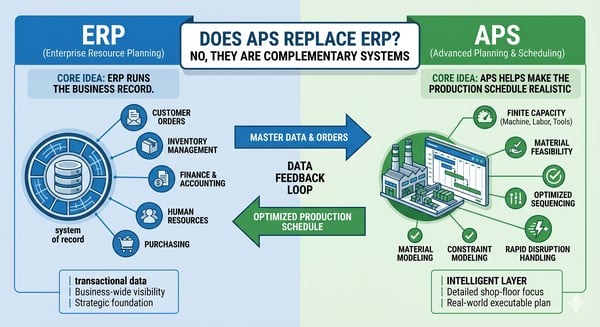
Does APS replace ERP?
APS and ERP serve different roles. ERP manages the business record, while APS helps turn ERP and production data into a realistic schedule.
Answer: No. ERP remains the system of record for orders, inventory, purchasing, BOMs, routings, and transactions. APS uses ERP and operational data to build a more realistic production schedule around capacity, materials, labor, changeovers, due dates, and plant constraints.
ERP runs the business record. APS helps make the production schedule realistic.

Where ERP Scheduling Stops and APS Scheduling Helps
ERP is essential for managing demand, inventory, purchasing, routings, and business transactions. But ERP scheduling often becomes limited when planners need to account for real-time production constraints such as machine capacity, labor availability, material shortages, setup rules, changeovers, and shifting priorities.
ERP helps manage the plan. APS helps determine what can realistically run, when it can run, and what constraints may affect the schedule.
| Planning need | ERP scheduling | APS scheduling |
|---|---|---|
| Manage orders, inventory, purchasing, and transactions | Strong | Uses this data for scheduling |
| Sequence production jobs | Basic or manual | Constraint-aware sequencing |
| Model finite capacity | Limited | Core scheduling function |
| Account for material availability | Available as source data | Included in schedule logic |
| Manage labor, tooling, and resources | Often limited | Built into the constraint model |
| Manage setup rules and changeovers | Often manual | Included in sequencing logic |
| Respond to rush orders and disruptions | Often spreadsheet-based | Scenario-based rescheduling |
| Compare what-if options | Limited | Core APS capability |
| Support planners | Transaction-focused | Decision-focused |
| Connect planning and operations | Limited or fragmented | Shared schedule visibility |
| Use MES, WMS, or shop-floor data | System-dependent | Supports current scheduling decisions |
| Help customer service see order risk | Often limited | Improves order and schedule visibility |
ERP remains critical for business records and transaction management. APS becomes valuable when manufacturers need a schedule that reflects real production constraints, not just planned dates.
Not sure whether ERP scheduling is enough?

Signs ERP Scheduling May Not Be Enough
APS may be worth evaluating when ERP data still has to be exported, adjusted, or rebuilt manually before the schedule reflects real production constraints.
Common signs include:
-
Exports ERP data into spreadsheets to build the real schedule
-
Rebuilds schedules manually when priorities change
-
Struggles to account for capacity, materials, labor, tooling, or changeovers
-
Cannot quickly see which orders are at risk
-
Needs better visibility across planning, production, purchasing, warehouse, and customer service
-
Has ERP dates that do not match shop-floor reality
Recognize these issues?
Review your ERP scheduling process, production constraints, and data readiness with a PlanetTogether APS specialist.
How PlanetTogether APS Works with ERP, MES, WMS, and Production Data
PlanetTogether APS does not replace ERP. It uses ERP and operational data to help planners build schedules that reflect real production constraints. Depending on the environment, APS can use data from ERP, MES, WMS, labor, inventory, supply chain, spreadsheets, databases, and shop-floor systems.
The exact data flow depends on your ERP environment, production process, and scheduling requirements.
| System or data source | Data APS may use | How it supports scheduling |
|---|---|---|
| ERP | Orders, due dates, item masters, BOMs, routings, inventory, purchasing data | Gives APS the business and production data needed to build the schedule |
| MES | Production status, completions, downtime, actual progress, shop-floor events | Helps planners adjust schedules based on current production conditions |
| WMS | Inventory movement, warehouse status, material availability | Helps determine whether required materials are available before jobs are scheduled |
| Labor systems | Shifts, labor availability, skills, crews, assignments | Helps schedule work around available people and required skills |
| Supply chain systems | Forecasts, supplier timing, material constraints, demand changes | Helps planners understand demand and material timing constraints |
| Spreadsheets/databases | Supplemental planning data, custom constraints, legacy scheduling inputs | Helps teams include planning rules or data not fully managed in ERP |
The goal is not to duplicate ERP. ERP remains the system of record. PlanetTogether APS uses ERP and production data to create a more realistic schedule around capacity, materials, labor, changeovers, due dates, and current plant conditions.
Common ERP and business systems PlanetTogether can support include:
- SAP
- Microsoft Dynamics
- Oracle
- NetSuite
- Infor
Integration needs vary by environment, data quality, workflows, and planning requirements. A scheduling fit review can help determine which data sources are needed for your production scheduling process.
Want to know whether your ERP data is ready for APS?
Review your ERP, MES, WMS, inventory, labor, and production data with a PlanetTogether APS specialist.
ERP vs. APS: Understanding the Key Differences in Production Scheduling
Compare ERP scheduling and APS to understand which approach best supports your production constraints, resources, and planning requirements.

When ERP Scheduling May Be Enough
ERP scheduling may be enough when production is stable, constraints are limited, and planners do not need frequent what-if scheduling decisions.
ERP scheduling may be enough if:
Production is simple and stable
Capacity is rarely constrained
Schedule changes are infrequent
Materials are usually available when needed
Changeovers have little impact on production flow
Planners rarely need to compare what-if scenarios
One site or one production flow is easy to manage manually
But when production becomes more constrained, variable, or cross-functional, ERP dates alone may not reflect what can realistically happen on the shop floor.

When APS Becomes the Better Fit Than ERP Scheduling
APS becomes more valuable when production schedules need to reflect real constraints, frequent changes, and cross-functional visibility that ERP scheduling alone may not fully support.
APS becomes more valuable when:
Production has real capacity constraints
Priorities change often
Orders compete for limited resources
Materials affect what can run
Changeovers and setup rules affect sequencing
Multiple departments need shared schedule visibility
Customer service needs better order-status visibility
Planners need to compare what-if scheduling options
ERP dates do not match shop-floor reality
If several of these issues are familiar, the next step is not replacing ERP. It is evaluating whether APS can use your ERP and production data to build a more realistic schedule
Why Manufacturers Add PlanetTogether APS Alongside ERP
Manufacturers use PlanetTogether APS alongside ERP when ERP data still needs to become a realistic production schedule. PlanetTogether helps planners account for capacity, materials, labor, changeovers, priorities, and current production conditions without replacing ERP.
PlanetTogether APS helps teams:
- Turn ERP and production data into more realistic schedules
- Build schedules around finite capacity, materials, labor, and changeovers
- Evaluate what-if scenarios before committing to schedule changes
- Improve visibility across planning, production, purchasing, warehouse, customer service, and operations
- Reduce spreadsheet-based scheduling workarounds
- Improve scheduling while keeping ERP as the system of record
For manufacturers that already rely on ERP, PlanetTogether acts as a scheduling layer that helps planning teams make better decisions from the data they already manage.
Proof That APS Can Work Alongside ERP
ERP systems are essential for orders, inventory, finance, purchasing, and master data. But when manufacturers need feasible schedules that reflect real constraints, many teams add PlanetTogether APS as a planning and scheduling layer connected to ERP, MES, MRP, and production data.

When ERP Scheduling Tools Were Not Enough
Graphic Packaging relied on enterprise systems, but available ERP planning tools could not fully support complex make-to-order scheduling. PlanetTogether APS helped the team use enterprise data for more structured plant-level scheduling, execution, and optimization.
APS Alongside MySAP
A medical device manufacturer used PlanetTogether APS alongside MySAP to support complex scheduling across thousands of products and concurrent production orders. APS helped planners evaluate schedule changes, improve visibility, and manage production complexity without replacing ERP.

APS vs ERP Scheduling: Frequently Asked Questions
ERP systems are essential for managing orders, inventory, purchasing, BOMs, routings, and business records. But many manufacturers still need APS when ERP dates do not reflect real production constraints.
These FAQs explain where ERP scheduling ends, where APS helps, and when manufacturers should evaluate APS alongside their existing ERP system.
Does APS replace ERP?
No. APS does not replace ERP. ERP remains the system of record for orders, inventory, purchasing, BOMs, routings, and transactions. APS uses ERP and operational data to create a more realistic production schedule around capacity, materials, labor, changeovers, due dates, and plant constraints.
How is APS different from ERP scheduling?
ERP scheduling is usually tied to business records, planned dates, routings, inventory, and transactions. APS scheduling focuses on creating feasible production schedules based on real operating constraints such as finite capacity, material availability, labor, tooling, changeovers, and shifting priorities.
Why do manufacturers use APS alongside ERP?
Manufacturers use APS alongside ERP when ERP data still needs to become a realistic production schedule. APS helps planners use ERP, MES, WMS, labor, inventory, and production data to evaluate what can run, when it can run, and which constraints may affect the schedule.
When is ERP scheduling not enough?
ERP scheduling may not be enough when planners export ERP data into spreadsheets, rebuild schedules manually, struggle to account for finite capacity, or cannot quickly see how materials, labor, changeovers, bottlenecks, and rush orders affect delivery dates.
What data does APS need from ERP?
APS may use ERP data such as customer orders, due dates, item masters, BOMs, routings, inventory, purchasing data, production requirements, and work-center information. Depending on the environment, APS may also use MES, WMS, labor, supply chain, spreadsheet, database, and shop-floor data.
Can APS work with MES, WMS, or shop-floor systems?
Yes. APS can use operational data from MES, WMS, labor systems, inventory systems, supply chain systems, spreadsheets, databases, and shop-floor sources. These data sources help planners build schedules that better reflect current production conditions.
How does APS help reduce spreadsheet-based scheduling?
APS helps reduce spreadsheet-based scheduling by using ERP and production data in a structured scheduling environment. Instead of exporting data, manually rebuilding schedules, and updating spreadsheets, planners can evaluate constraints, changes, what-if scenarios, and schedule tradeoffs in one shared system.
Is APS only useful for complex manufacturing?
APS is most useful when production schedules must account for constraints, frequent changes, competing orders, material availability, labor, tooling, changeovers, or multi-site coordination. If production is simple, stable, and rarely constrained, ERP scheduling may be enough.
Can APS help customer service and operations teams?
Yes. APS can improve shared schedule visibility across planning, production, purchasing, warehouse, customer service, and operations teams. This helps teams understand order status, schedule risk, material constraints, and the impact of priority changes before customers are affected.
What is the next step if we already use ERP?
The next step is not replacing ERP. It is evaluating whether APS can use your ERP and production data to build a more realistic schedule. A scheduling fit review or APS readiness assessment can help determine whether APS is appropriate for your production environment, data stack, and planning process.


