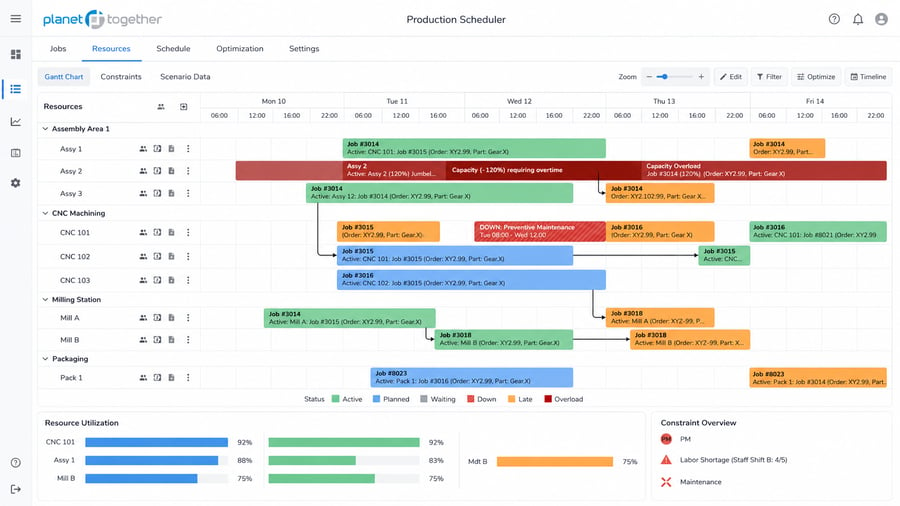
Finite Capacity Scheduling Software for Real Plant Constraints
PlanetTogether APS helps manufacturers build realistic production schedules around finite machine capacity, labor, materials, tooling, routings, changeovers, and due dates.
Move beyond infinite-capacity assumptions, spreadsheet firefighting, and ERP dates that do not reflect shop-floor constraints. See what your plant can actually run, when it can run, and which bottlenecks may affect delivery.
Best fit for: constrained machines, labor shortages, material delays, complex routings, frequent changeovers, bottlenecks, or schedules that change faster than ERP dates can keep up.
What Is Finite Capacity Scheduling Software?
Finite capacity scheduling software helps manufacturers create production schedules based on the real availability of machines, work centers, labor, tooling, materials, and production time.
ERP may show when work is needed. Finite capacity scheduling helps show whether that work can actually run.
Unlike infinite-capacity scheduling, which may assume resources are always available, finite-capacity scheduling checks each job against the plant's capacity limits before it is placed on the schedule. This helps planners identify capacity conflicts before they become late orders, overtime, idle time, or shop-floor disruption.
A finite-capacity schedule can account for:
- Machine and work center availability
- Labor and skill requirements
- Tooling and fixture constraints
- Material availability and shortages
- Routings, operation sequences, and setup times
- Changeover rules and production priorities
- Maintenance, downtime, and unavailable capacity

PlanetTogether APS uses finite-capacity and constraint-based scheduling logic to help production teams plan around real manufacturing conditions. Planners can evaluate what can run, when it can run, what resources are required, and how schedule changes affect downstream work.
For manufacturers that have outgrown spreadsheets or basic ERP scheduling, finite capacity scheduling gives planners a more reliable way to manage bottlenecks, protect delivery commitments, and respond as plant conditions change.
Why Infinite-Capacity Scheduling and ERP Dates Break Down
Many manufacturers start with ERP dates, MRP plans, or spreadsheets. These tools can help organize demand and production requirements, but they often struggle when the schedule needs to reflect real capacity.
Finite capacity scheduling becomes important when the plant has more work than available resources, or when materials, labor, tooling, machines, changeovers, and priorities all compete for the same production window.
Capacity assumptions hide bottlenecks
Infinite-capacity planning may show when work should happen, but it does not confirm whether machines, labor, tooling, and materials are actually available at that time.
The result is a schedule that looks feasible in planning but breaks down when it reaches the shop floor.
ERP dates require manual adjustment
ERP systems are strong systems of record, but planners often still need to adjust sequences, resource assignments, changeovers, and start dates manually.
That manual work slows scheduling, increases firefighting, and makes it harder to explain why priorities changed.
Spreadsheets become difficult to maintain
Excel schedules often depend on manual updates, planner knowledge, and version control.
As orders, constraints, and priorities change, spreadsheets become harder to trust, harder to share, and easier to break.
That makes it harder for teams to know which schedule version reflects the latest plant reality.
Schedule changes create ripple effects
A rush order, machine outage, late material, labor shortage, or changeover delay can affect every job behind it.
Without finite capacity scheduling, planners may not see the downstream impact until delivery risk, overtime, or missed commitments are already likely.
If your team is constantly changing dates, checking capacity manually, or explaining why a schedule changed after it was released, finite capacity scheduling may be worth evaluating.
When to Evaluate Finite Capacity Scheduling Software
Finite capacity scheduling is usually worth evaluating when production plans change faster than ERP dates, spreadsheets, or manual scheduling processes can keep up.
-
Your schedule changes faster than your current tools can keep up.
-
ERP or MRP dates do not reflect what the plant can realistically run.
-
Planners manually rebuild schedules when priorities change.
-
Bottlenecks are discovered too late to avoid delivery risk.
-
Machines, labor, tooling, materials, or changeovers regularly drive conflicts.
-
Teams rely on overtime, expediting, or tribal knowledge to keep orders moving.
-
Customer service, planning, and operations do not share one trusted schedule.
If two or more of these sound familiar, finite-capacity scheduling software is worth evaluating.
.png?width=600&height=600&name=ERP%20and%20APS%20PlanetTogether%20(1).png)
How PlanetTogether APS Supports Finite Capacity Scheduling
PlanetTogether APS helps manufacturers turn production requirements into feasible schedules by modeling real constraints and showing the tradeoffs behind each scheduling decision. For teams managing high-mix production, multiple plants, shared resources, changing priorities, or complex routings, finite capacity scheduling helps standardize scheduling logic and improve visibility across production environments.
Model finite capacity across machines and work centers
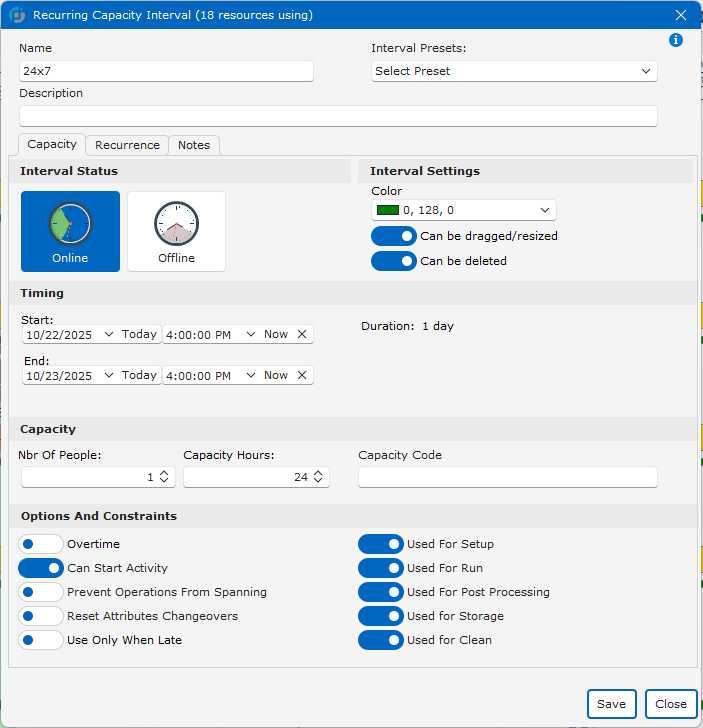
Schedule work based on available production capacity, not assumptions. PlanetTogether APS helps planners account for machine time, work center limits, and constrained resources when building the schedule.
Sequence work around changeovers and setups
Plan production sequences with setup time, changeover rules, cleaning requirements, or transition logic in mind. This helps reduce avoidable downtime and supports more stable production flow.
Align labor, tooling, and materials
A machine is not truly available if the required operator, tooling, material, or setup window is missing. PlanetTogether APS helps planners schedule around the combined constraints that determine whether work can actually run.
Improve schedule visibility across teams
Give production planners, operations leaders, plant managers, and customer-facing teams a clearer view of schedule status, capacity risk, and delivery impact.
Identify bottlenecks earlier
See where capacity conflicts may delay work before they affect delivery. Planners can identify overloaded resources and evaluate different schedule options before releasing updates to the plant.
Run what-if schedule scenarios
Compare options before committing changes. Planners can test the impact of rush orders, downtime, material delays, staffing changes, priority shifts, or changeover disruptions before publishing a new schedule. This helps teams respond faster when conditions change.
Finite Capacity vs. Infinite Capacity Scheduling
Finite capacity scheduling and infinite capacity scheduling answer different production planning questions.
Infinite-capacity scheduling asks: When should this work happen?
Finite-capacity scheduling asks: When can this work realistically happen based on available machines, labor, materials, tooling, and production time?

Infinite Capacity Scheduling
Assumes resources are available when work is needed.
May create dates without checking real machine, labor, material, or tooling constraints.
Often requires planners to manually resolve overloads after the schedule is created.
Can work for high-level planning, demand planning, or simple production environments.
Shows what should happen based on planned dates.

Finite Capacity Scheduling
Checks available machines, labor, tooling, materials, and production time.
Helps planners build schedules the plant can actually run.
Identifies bottlenecks, overloads, and resource conflicts earlier.
Supports detailed production scheduling in constrained manufacturing environments.
Shows what can realistically happen, when it can happen, and why.
Infinite-capacity scheduling can help manufacturers plan demand and target dates. Finite-capacity scheduling helps manufacturers build production schedules that account for real machine capacity, material availability, labor coverage, sequencing rules, and delivery commitments.
For complex manufacturers, the issue is not only knowing what needs to be made. The harder problem is knowing what can actually run, when it can run, and what constraints may affect delivery.
Core APS Use Cases in Real Manufacturing Environments
Manufacturers use Advanced Planning and Scheduling software for different scheduling challenges. Some teams need better daily production scheduling. Others need finite capacity planning, capacity visibility, or schedule optimization. These examples show how APS applies to real manufacturing environments.

Built for Teams That Need Schedules They Can Trust
Finite capacity scheduling is most valuable when multiple teams depend on the same production plan, but each team needs a different view of capacity, materials, labor, priorities, and delivery risk.
Production Planners & Schedulers
Build and adjust feasible schedules around capacity, materials, labor, tooling, changeovers, and due dates without relying on fragile spreadsheets or manual workarounds.
Operations Leaders
See bottlenecks, schedule risk, resource conflicts, and production priorities across teams so planners can respond faster to disruptions.
Plant Managers
Improve visibility into schedule performance, constrained resources, throughput, downtime, and delivery risk across the plant.
Supply Chain and Customer Service Teams
Understand how material availability, order priorities, and production timing affect delivery dates so customer commitments are based on a realistic schedule.
IT and ERP Teams
Use APS as a finite-capacity scheduling layer that works with ERP, MES, and production data instead of replacing core business systems.
Manufacturing Executives
Align production plans with business goals, customer commitments, and capacity realities so leadership can make confident decisions.
Best fit: PlanetTogether APS is a strong fit for manufacturers managing constrained capacity, frequent schedule changes, complex routings, material variability, labor constraints, changeovers, high-mix production, or multi-site planning needs.
Less urgent: It may be less urgent for manufacturers with simple routings, low schedule variability, few constraints, and stable production volumes.
APS Features for Finite Capacity Scheduling
PlanetTogether APS includes capabilities designed to help manufacturers schedule around real production constraints.
Finite Capacity Modeling
Model machines, work centers, labor, tooling, and other constrained resources so the schedule reflects what the plant can actually run.
Bottleneck Visibility
Identify overloaded resources, constrained work centers, and schedule risks before they create missed handoffs or late orders.
Material Availability Planning
Schedule work around material availability, shortages, purchase timing, and inventory constraints so jobs are not released before required materials are ready.
Labor and Skill Constraints
Match jobs to available operators, crews, certifications, shifts, and labor capacity so schedules account for who can actually perform the work.
What-If Scenario Planning
Compare schedule options before committing changes. Planners can test the impact of rush orders, downtime, staffing changes, material delays, or priority shifts before releasing updates to the shop floor.
ERP, MES, and Shop-Floor Data
Use planning, order, inventory, routing, and production data from business and shop-floor systems to support a more accurate scheduling process.
Changeover and Setup Sequencing
Sequence work to reduce unnecessary setup time, cleaning time, transition loss, or changeover disruption.
KPI Tracking and Continuous Improvement
Monitor schedule adherence, resource utilization, bottlenecks, throughput, delivery risk, and other planning KPIs over time.
Frequently Asked Questions About Finite Capacity Scheduling Software
What is finite capacity scheduling software?
Finite capacity scheduling software helps manufacturers create realistic production schedules based on available capacity. It accounts for constraints such as machines, labor, tooling, materials, routings, setup times, changeovers, and due dates so planners can see what work can actually run.
How is finite capacity scheduling different from infinite capacity scheduling?
Infinite capacity scheduling assumes resources are available when needed. Finite capacity scheduling checks real resource availability before assigning work. This makes finite capacity scheduling better suited for manufacturers with bottlenecks, limited machines, labor constraints, material shortages, or complex routings.
Is finite capacity scheduling the same as advanced planning and scheduling, or APS software?
Finite capacity scheduling is a core capability of many advanced planning and scheduling systems. APS software usually goes beyond finite capacity by supporting constraint-based scheduling, what-if scenarios, material planning, labor and resource coordination, ERP/MES integration, and schedule optimization.
How does finite capacity scheduling help with bottlenecks?
Finite capacity scheduling helps planners see which resources are overloaded before the schedule is released. Bottlenecks may include machines, work centers, labor, tooling, materials, or changeovers. By making those constraints visible earlier, planners can adjust sequences, priorities, or resource assignments before delivery is affected.
Does finite capacity scheduling replace ERP?
Finite capacity scheduling software does not usually replace ERP. ERP remains the system of record for orders, inventory, purchasing, financials, items, bills of material, and routings. APS uses planning data from ERP and other systems to create realistic production schedules around real capacity and shop-floor constraints.
What data does finite capacity scheduling software use?
Finite capacity scheduling software can use data such as orders, due dates, routings, work centers, machine capacity, labor availability, tooling, material availability, inventory, setup times, changeover rules, production status, and priorities. The quality of the schedule depends on the quality and completeness of the planning data.
When should a manufacturer evaluate finite capacity scheduling software?
A manufacturer should evaluate finite capacity scheduling software when schedules are frequently rebuilt manually, ERP dates do not match shop-floor reality, bottlenecks are discovered too late, material or labor constraints cause delays, or planners rely on spreadsheets and tribal knowledge to keep production moving.
Can finite capacity scheduling support multi-site manufacturing?
Yes. Finite capacity scheduling can support multi-site manufacturing by helping teams compare demand, resources, constraints, and schedule impact across plants. This is useful when manufacturers need better visibility, consistent scheduling logic, or coordinated planning across facilities.
How do I know if my plant is ready for finite capacity scheduling software?
Finite capacity scheduling is worth evaluating when your team has reliable order, routing, resource, material, and capacity data but still struggles to build realistic schedules. It is especially useful when planners spend significant time adjusting ERP dates, resolving overloads manually, or explaining why released schedules changed.
What business outcomes can finite capacity scheduling support?
Finite capacity scheduling can help manufacturers improve schedule reliability, reduce manual planning work, increase visibility into bottlenecks, respond faster to disruptions, reduce avoidable expediting, and protect delivery commitments. Results depend on planning complexity, data quality, adoption, and implementation scope.
Ready to Build Production Schedules Around Real Capacity?
See how PlanetTogether APS helps manufacturers move beyond infinite-capacity assumptions, spreadsheet firefighting, and ERP schedule limitations.
Build feasible schedules around machines, labor, materials, tooling, changeovers, routings, bottlenecks, and due dates.
Review how your team can schedule around capacity, materials, labor, changeovers, and due dates.


