Production Scheduling Software for Real-World Manufacturing Constraints
Replace fragile spreadsheets and limited ERP scheduling with APS software that helps planners build realistic, constraint-based schedules faster.
Trusted by manufacturers replacing spreadsheet and ERP-based scheduling with constraint-aware APS.
Production Scheduling Software for Real-World Manufacturing Constraints
What Is Production Scheduling Software?
Production scheduling software helps manufacturers plan, sequence, and adjust production work based on real-world constraints. It helps teams create schedules that reflect what can actually happen in production, not just what was planned.
For manufacturers that have outgrown spreadsheets or basic ERP scheduling, production scheduling software gives planners a clearer way to respond to changes, compare options, and keep work moving when demand, supply, labor, or equipment conditions shift.
Advanced Planning and Scheduling, or APS software, is a more advanced type of production scheduling software. APS uses constraint-based scheduling logic to build realistic production schedules around finite capacity, material availability, routings, labor, changeovers, and priorities.
Unlike ERP systems, which primarily manage business data and transactions, APS software helps planners create feasible schedules that reflect real plant constraints and current shop-floor conditions.

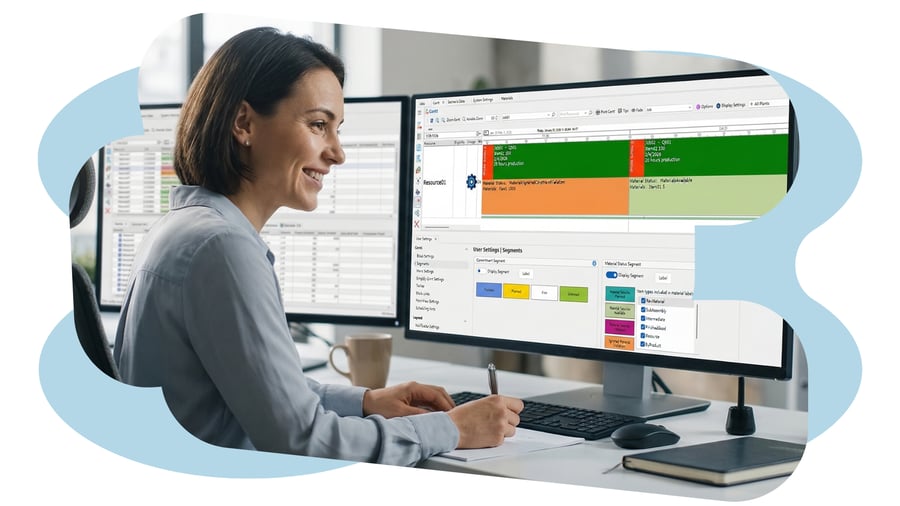
Example production schedule view showing how planners can evaluate work against capacity, materials, and changing shop-floor condition.
Why Excel and ERP Scheduling Break Down
Many manufacturers start with spreadsheets or ERP scheduling, but those tools often struggle when production becomes more complex, constrained, or changeable.
Excel becomes fragile
Spreadsheets are difficult to maintain as orders, materials, constraints, and priorities change. Version control issues, manual updates, and hidden assumptions make it harder to keep production schedules accurate.
ERP isn’t built for detailed scheduling
ERP systems manage business data well, but they often lack the finite-capacity logic needed to schedule around machines, labor, materials, changeovers, and due dates.
Schedules don’t reflect real constraints
Production schedules often look good on paper but fail on the shop floor because they do not reflect actual capacity, materials, labor, changeovers, or current operating conditions.
-1.png?width=700&height=394&name=Graphics%20Landing%20page%20(1)-1.png)
You may be ready for APS if...
Your production schedule is changing faster than your current tools can keep up.
- Planners rebuild schedules manually when priorities change.
- Excel or ERP schedules do not reflect real capacity constraints.
- Late orders are discovered too late to recover cleanly.
- Machines, labor, materials, or changeovers regularly drive schedule conflicts.
- Teams rely on overtime, expediting, or tribal knowledge to keep production moving.
- Production, planning, and customer service do not share one trusted schedule.
If two or more sound familiar, APS is worth evaluating.

What APS Production Scheduling Software Helps You Do
APS production scheduling software helps planners build feasible schedules, respond to change, and manage real-world constraints that spreadsheets and basic ERP scheduling often miss.
Model finite capacity and bottlenecks
Model real capacity across machines, lines, labor, tooling, and resources so planners can build schedules the plant can actually run.
Adjust schedules in real time
Respond to rush orders, downtime, shortages, and priority changes without rebuilding schedules from scratch.
Plan around material shortages and late supplies
See material constraints earlier and adjust production schedules before shortages delay work.
Run what-if scenarios
Compare schedule options before committing changes to the plant.
Reduce manual coordination and expediting
Reduce time spent chasing updates, reconciling spreadsheets, and coordinating last-minute schedule changes.
Improve visibility across production teams
Give planners, operations, and plant leaders a shared view of schedule status, constraints, and priorities.
Manage changeovers, cleaning, and sequencing
Sequence work to reduce unnecessary changeovers, cleaning time, and production disruption.
Support multi-plant scheduling
Coordinate schedules across multiple sites with consistent planning logic, visibility, and priorities.
APS vs. ERP Scheduling
ERP systems help manufacturers manage orders, inventory, purchasing, and financial records. APS scheduling software uses that data to create feasible production schedules based on real capacity, materials, labor, changeovers, and shop-floor constraints.

ERP Scheduling
-
Manages orders, inventory, purchasing, and financial records
-
Often assumes capacity is available
-
May require manual workarounds for detailed sequencing
-
Shows what needs to happen

APS Scheduling
-
Built for detailed production scheduling
-
Models finite capacity, constraints, and dependencies
-
Helps planners compare options and adjust schedules dynamically
-
Shows what can realistically happen, when, and why
Bottom line: ERP tells manufacturers what needs to happen; APS helps planners determine what can realistically happen based on capacity, materials, labor, changeovers, and current production constraints.
Core APS Use Cases in Real Manufacturing Environments
Manufacturers use Advanced Planning and Scheduling software for different scheduling challenges. Some teams need better daily production scheduling. Others need finite capacity planning, capacity visibility, or schedule optimization. These examples show how APS applies to real manufacturing environments.

Built for Manufacturing Teams That Need Reliable Schedules
Built for teams responsible for production scheduling, APS software helps planners and operations leaders manage constraints, improve schedule accuracy, and adapt as shop-floor conditions change.
Production Planners & Schedulers
Build and adjust feasible schedules around capacity, materials, labor, changeovers, and due dates without relying on fragile spreadsheets.
Operations Leaders
See bottlenecks, schedule risk, and production priorities across teams so you can respond faster to disruptions.
Plant Managers
Improve visibility into schedule performance, resource constraints, throughput, and delivery risk across the plant.
Production Scheduling Software and APS FAQs
What is production scheduling software?
Production scheduling software helps manufacturers plan, sequence, and adjust production work based on real-world constraints such as capacity, materials, labor, changeovers, due dates, and shop-floor conditions. It helps planners create schedules that reflect what the plant can actually run, not just what was originally planned.
What is APS software and how is it different?
APS, or Advanced Planning and Scheduling, is a more advanced type of production scheduling software. APS uses constraint-based scheduling logic to create realistic production schedules around finite capacity, material availability, labor, routings, changeovers, and priorities. Unlike basic scheduling tools, APS helps planners compare options and adjust schedules as conditions change.
How is APS different from ERP scheduling?
ERP systems manage business data such as orders, inventory, purchasing, financial records, and routings. APS scheduling software uses that data to create feasible production schedules based on real capacity, materials, labor, changeovers, and shop-floor constraints. ERP shows what needs to happen; APS helps planners determine what can realistically happen, when, and why.
Who should use production scheduling software?
Production scheduling software is used by production planners, schedulers, operations leaders, plant managers, and supply chain teams. It is especially useful for manufacturers with complex production environments, frequent schedule changes, constrained resources, material shortages, changeovers, or multi-site planning needs.
What are the benefits of APS production scheduling?
APS production scheduling helps manufacturers build more realistic schedules, improve on-time delivery, reduce bottlenecks, respond faster to disruptions, and reduce manual scheduling work. It also improves visibility across production teams by showing how capacity, materials, labor, changeovers, and priorities affect the schedule.
Does production scheduling software replace ERP?
Production scheduling software does not usually replace ERP. ERP systems manage business records such as orders, inventory, purchasing, financials, and routings. APS production scheduling software complements ERP by using ERP data to build realistic schedules around capacity, materials, labor, changeovers, and shop-floor constraints.
When should manufacturers move beyond Excel scheduling?
Manufacturers should move beyond Excel scheduling when planners spend too much time rebuilding schedules manually, reconciling spreadsheet versions, responding to rush orders, or trying to account for capacity, materials, labor, and changeovers by hand. APS software helps teams create schedules that are easier to update and more realistic for the plant.
What data does production scheduling software use?
Production scheduling software can use data such as orders, due dates, routings, inventory, work centers, machine capacity, labor availability, material availability, changeover rules, and shop-floor status. APS software uses this data to help planners create schedules that reflect real production constraints.

